1
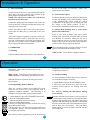
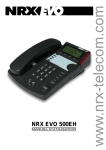
The layout of your NRX EVO 250
Ringer/MWI Indicator
Wall Mount Tab
Memory Buttons
Number Keypad
ABC
DEF
1
2
3
GHI
JKL
MNO
4
5
6
PQRS
TUV
WXYZ
7
8
9
SW4
90V MWI
Headset Mic
TX Volume
Tone Button
HEADSET MIC
TX VOLUME
Handset
Socket
Program Button
R
REDIAL/P
HICOM SENS.
LOW / HIGH
Recall Button
HICOM
Sensitivity
(LOW/HIGH)
Redial/
Pause Button
Mute Button
0
Headset Button
Digital Volume Control
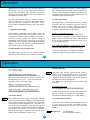
Contents
1.
INSTALLATION
2.
OPERATION
2.1
2.2
2.3
2.4
2.5
2.6
2.7
2.8
2.9
2.10
2.11
2.12
2.13
2.14
2.15
2.16
2.17
2.18
2.19
Dialling
Tone or Pulse Option
Mixed Mode Dialling
Programming The Memory Buttons
Memory Dialling
Privacy (Muting the Microphone during Conversation)
Impedance Matching
Modem/Data Connection Socket
Message Waiting
Pause Button
Recall Facility
Last Number Redial
Adjustable Ringing Volume
Adjustable Ringing Tone Pitch
Dual Headset Facility
Headset Auto Answer
Receiver Volume
Headset Stand (Option)
Hearing Aid Compatibility
3.
4.
5.
6.
7.
WALL MOUNTING THE UNIT
APPROVED USE
CE APPROVED
NUMBER OF PHONES THAT CAN BE CONNECTED
WARRANTY
1