1
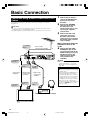
Basic Connection
Using Other Types of Video Output
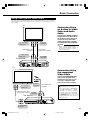
In order to view clearer DVD images, it is recommended that you use a commercially available S-video or component video cable when connecting your TV to the
video output.
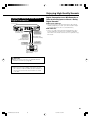
TV
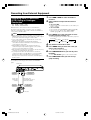
Connecting Using
an S-video or Video
Cable and Audio
Cable
To S-video
input jack
To video/audio
input jacks
or
S-video cable
(commercially available)
Video/Audio cable
(supplied)
To VIDEO/AUDIO
output jacks
Connect the S-VIDEO or VIDEO
Output jack on this Recorder to
the S-video or video input jack
on your TV using an S-video
cable (commercially available)
or Video/Audio cable (supplied).
NOTE
• When connecting both S-video
cable and Video/Audio cable to the
Recorder, the image of S-video
cable is displayed.
To S-VIDEO
output jack
The Recorder
TV
Connecting Using
the component
Video Cable
Connect the COMPONENT OUT
jacks on this Recorder to the
component input jacks on your
TV using a component video
cable (commercially available).
To audio
input jacks
To component
input jacks
Component video cable
(commercially available) To AUDIO
output jacks
The Recorder
Video/Audio cable
(supplied)
Important!
• When using this connection:
If the option under “START MENU”
- “OTHER SETTINGS 2” - “MODE
SETTING” - “L1 OUT” is changed
to “RGB”, no picture is displayed
on the TV. In this case, hold down
the RGB OFF button on the remote
control (under the cover) for more
than 2 seconds.
To COMPONENT
OUT jacks
23
DV-HR350H/300H-022-025
23
2004.4.8, 10:36 AM