1
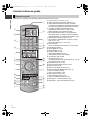
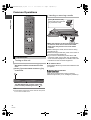
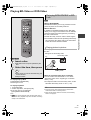
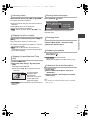
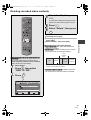
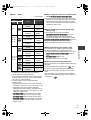
DMRBW880&780EB-VQT2J65_eng.book 6 ページ 2010年4月8日 木曜日 午後3時59分 Control reference guide Remote control Getting started Instructions for operations are generally described using the remote control. TV VOL DRIVE SELECT CH AV PAGE 1 2abc 3def 4ghi 5jkl 6mno CH 7pqrs 8 tuv 9wxyz DEL INPUT PROG/CHECK SELECT 0 SKIP REW LIVE TV STOP PLAY/x1.3 PAUSE LIVE TV EXIT DIRECT NAVIGATO R GUIDE OK ME NU STATUS PAUSE C TION FUN BACK/ RETURN OPTION 6 VQT2J65 SLOW/SEARCH REC REC MODE EXT LINK DIRECT TV REC TEXT STTL AD DISPLAY CHAPTER TIME SLIP MANUAL SKIP -10s +60s 1 Turn the unit on or off (> 11, 14) 2 Select drive (HDD, BD, SD or USB) (> 14) 3 Select channels and title numbers, etc./Enter numbers or characters (The character buttons may be used when operating VIERA CAST contents.) 4 To delete unwanted recorded titles, timer programmes, still pictures or music (> 39) 5 Basic operations for recording and play 6 Show channel information (> 17)/Programme information within TV Guide screen (> 19)/Show status messages (> 37)/Show Information (> 35) 7 Selection/OK, Frame-by-frame (> 37) 8 Show DIRECT NAVIGATOR, Top menu, Pop-up Menu (> 31, 34) 9 Show OPTION menu (> 40, 52, 59) : Colour buttons Use in accordance with instruction on the screen. ; Recording functions < Show digital text (> 18) = Show subtitles (> 18) > Create chapter (> 43) ? Skip the specified time (> 37) @ Transmit the remote control signal A TV operation area (> 88) B Channel select (> 16)/ Change pages in the TV Guide system etc. (> 19) C Show VIERA CAST (> 65) D Input select (> 16, 21, 62) E Show Timer Recording screen (> 28) F Exit the menu screen G Show the TV Guide screen (> 19) H Show FUNCTION MENU window (> 15) I Return to previous screen J Direct TV recording (> 23) K EXT LINK function (> 64) L Show Playback menu (> 70) M Listen to Audio Description (> 18) N Skip approx. 1 minute forward (> 36) O Skip approx. 10 seconds backward (> 36)