1
Digital BUS-WATCH® PC Software Manual
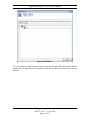
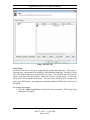
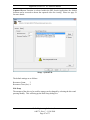
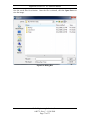
Search Video File Dialog Box
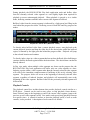
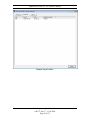
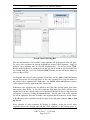
The start and end time of all available video segments will be displayed in the left pane.
To select video segments for backup, highlight the desired video segments. Single or
multiple video segments may be selected simultaneously. Use the keyboard CTRL
Button on the keyboard in conjunction with the left mouse button to select multiple files
by clicking each file, or use the keyboard SHIFT Button and the left mouse button to
select a range of files.
To designate the selected video segments for backup, use the Add or Add All Buttons
located between the left and right panes of the video segment list to copy the names of
the selected video segments to the right pane. Use the Del or Del All Buttons to remove
video segments from the right hand pane, if necessary.
Additional video segments may be added to the right pane (backup pane) from other
dates and/or other DVRs. To list video segments from other dates and/or DVRs, select
another date from the calendar and/or select another DVR from the Device drop down list,
and initiate a search by clicking the Search Button. The left pane of the video segment
list will be updated to show the available video segments based on the new search criteria.
Add additional video segments from the left pane to the right pane using the Add or Add
All Buttons.
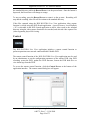
After selection of video segments for backup is complete, accept the list of video
segments selected for backup and add the video segments to the backup queue by
Radio Engineering Industries, Inc.
640372 - Rev C - 11/10/2009
Page 62 of 75