1
- 58 -
GRMON User’s Manual
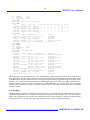
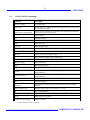
==========
0x40000400
0x40000410
0x40000420
0x40000430
0x40000440
0x40000450
0x40000460
0x40000470
0x40000480
0x40000490
===== ===========
BC-RT
01:30
RT-BC
01:30
BC-RT
01:30
RT-BC
01:30
BC-RT
01:30
RT-BC
01:30
BC-RT
01:30
RT-BC
01:30
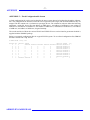
: SUSPEND
[Invalid transfer
== === ======= ====== == ======= ======= ==== ========
29 A 01:Same
0 14
s
[Not written] 40000000
29 A 01:Same
0 14
s
[Not written] 40000040
30 A 01:Same
0 14
s
[Not written] 40000000
30 A 01:Same
0 14
s
[Not written] 40000040
31 A 01:Same
0 14
s
[Not written] 40000000
31 A 01:Same
0 14
s
[Not written] 40000040
32 A 01:Same
0 14
s
[Not written] 40000000
32 A 01:Same
0 14
s
[Not written] 40000040
]
A
01:Same
0 14
OK 0 0000
5.23.3 Data transfers
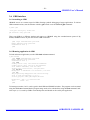
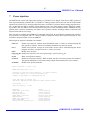
If the GR1553B core is BC capable, you can perform data transfers directly from the GRMON command line.
The commands exist in two variants: mil get and mil put that specify the data directly on the command line
and through the terminal, and mil getm and mil putm that sends/receives data to an address in RAM.
In order to perform BC data transfers, you must have a temporary buffer in memory to store descriptors and
data, see mil buf.
These commands use the asynchronous scheduling feature of the core, which means that the command can be
performed even if a regular BC schedule is running in parallel. The transfer will be performed while the primary schedule is idle without affecting the schedule. In most cases it can even be run with BC software active
in the background.
If the primary schedule blocks the asynchronous transfer for more than two seconds, the transfer will be
aborted and an error message is printed. This can happen if the running schedule does not have any slack, or if
it is stuck in suspended state or waiting for a sync pulse with no previous slot time left. In this case, you need to
stop the ordinary processing (see mil halt) and retry the transfer.
5.23.4 Temporary data buffer
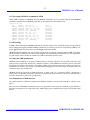
Many of the mil subcommands need a temporary data buffer in order to do their work. The address of this
buffer is set using the mil buf command and defaults to 0x40000000.
By default the driver will read out the existing contents and write it back after the command is done, this can be
changed using the mil bufmode command.
If the core is on a different bus where the RAM is at another address range, the scratch area address in the
core’s address space should be given as an additional coreaddr argument to the mil buf command.
5.23.5 Halting and resuming
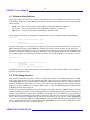
The mil halt command will stop and disable the RT,BC and BM parts of the core, preventing them from creating further DMA and 1553 bus traffic during debugging. Before this is done, the current enable state is stored,
which allows it to later be restored using mil resume. The core is halted gracefully and the command will wait
for current ongoing transfers to finish.
The state preserved between mil halt and mil resume are:
• BC schedules’ (both primary and async) states and next positions. If schedule is not stopped, the last
transfer status is also preserved (as explained below)
• BC IRQ ring position
AEROFLEX GAISLER AB