1
6-2
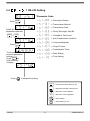
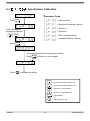
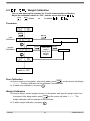
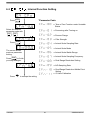
Weight Calibration
Turn on and warm up the machine for 15 to 30 minutes before calibration.
Adjust the calibration switch to “ON”, and the screen will show
TARE
ZERO
Press
or
to select
.
.
Procedure
ENTER
ENTER
Zero
Calibration
Zero calibration completed
ESC
ENTER
Weight
Calibration
ESC
Place the
weight
mass and
set the
weight
ENTER
Confirmed
Set calibration
switch to “OFF”
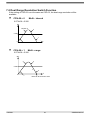
Zero Calibration
ENTER
a) Ensure nothing on the platter; after being stable, press
, and the screen will display
“……. ”. The zero calibration will be complete 5 seconds later.
b) To abort zero calibration, just press ESC .
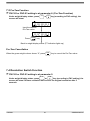
Weight Calibration
a) Place an object, whose weight is known, on the platter, and input the weight value from
front panel. After being stable, press
ENTER
and the screen will show “……. ”. The
weight calibration will be complete 5 seconds later.
b) To abort weight calibration, just press
FM/FMR
ESC
23
.
ZSME300000103