1
RN42221MUK Rev4_IB 02/07/2013 15:22 Page 3
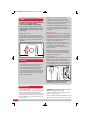
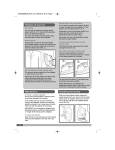
Steam generator overview
1
2
3
13
5
4
14
15
6
7
8
9
10
11
12
(1)
Steam boost button
(certain models only)
(6)
Iron
(11) Cord storage groove
(7)
Filling cap
(12) Cord clamp
(2)
Steam trigger
(8)
Detachable water tank
(13) Boiler key
(3)
Temperature dial
(9)
Control panel (see below)
(14) Boiler screw
(4)
Soleplate
(10) Base unit
(5)
Temperature indicator light
(15) Boiler cap
Control panel (9) overview
On/Off button 16
Power indicator light 17
Low water level indicator light 18
Descaling indicator light 19
Steam supply cord 23
On/Off button (16) and
Power indicator light (17)
Connect to a mains outlet and press the On/Off
Button (16). The power indicator light (17) will
illuminate and the low steam level button (20) will
flash. To turn off, press and hold the On/Off Button
(16) for 3 seconds. All indicator lights will go out.
Low water level indicator light (18)
If the water level is too low, the low water level
indicator light (18) will illuminate. See ‘Filling’ on
page 6.
20 Low steam level button
21 Medium steam level button
22 High steam level button
24 Power cord
Descaling indicator light (19)
If the boiler requires descaling, the descaling
indicator light (19) will illuminate. If this happens,
see ‘Cleaning the boiler’ on page 6.
Steam level buttons (Low 20 / Med 21 / High 22)
Press the relevant button to select your desired
steam level: low (20), medium (21) or high (22).
See ‘Using the Steam Generator for steam ironing’
on page 5.
3