1
Part functions
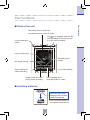
Recording time or remaining
recordable time for video or audio
icon appears when an SD
The
card is loaded in the unit (no icon
if no SD card is loaded)
Current operation
status
Input volume level
Recording level
setting
Mic angle setting
Lo-cut filter setting
Scene setting for
video recording
Sound quality when
recording audio or video
Image size/frame rate
during video recording
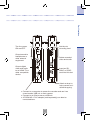
■■Installing batteries
Open the case while
pressing here and then
install the batteries.
Note: Use alkaline batteries or
rechargeable NiMH batteries.
2
Part functions
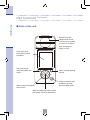
■■Parts of the unit