1
Chapter 9 - Operating units
Service program menus
The menu items of a service program are released
by a password when accessing the service program.
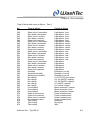
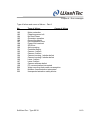
The following listing shows all menu items which may
be called from the operator or the owner of the rollover car wash system.
A menu item can be called directly by using the
number code.
0> Operator
01> Wash counter
010> Total counter
011> Lifetime
0110> Cash (Manual entry)
0111> Non-cash
0112> Servicing
012> Day
0120> Cash (Manual entry)
0121> Non-cash
0122> Servicing
0124> Clear day counter
02> Invoicing
020> Accounting
021> Prices
022> Promotion times (zone 2)
023> Currency and tax
024> Check Multibox Code
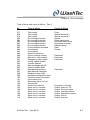
03> Machine settings
030> Modules On-Off
031> Lift control roof nozzle
032> Contact pressure
033> Door functions
034> Positioning lights
035> Automatic start
036> Manual control
037> Temperature setting
038> Spray arch
039> Bleed rim cleaner
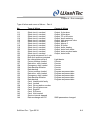
04> System settings
040> Date and time
041> Change password
042> Set telephone numbers
043> Station code
044> Opening hours
045> Selectable program names
046> Program names
047> Release
048> Multibox Setup Code
05> Create cards
06> Winter water control
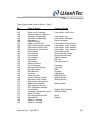
1> Évents
10> Display list
SoftCare Evo - Type SE10
9-21