1
MultiModemII User Guide
Table of Contents
Table of Contents
Chapter 1 - Description and Features ......................................................................... 5
Product Description .............................................................................................. 5
About AT Commands ........................................................................................... 5
Features ............................................................................................................... 5
Safety Warnings ................................................................................................... 6
Chapter 2 - Installation ............................................................................................... 7
Step 1 - Connect the Modem to Your System ...................................................... 7
Step 2 - Install the Modem Driver ......................................................................... 9
Removing an Old Modem Driver .......................................................................... 9
Step 3 - Setting Your Country or Region Code ................................................... 10
Step 4 - Install PhoneTools ................................................................................ 11
Chapter 3 - Using the Front Panel ............................................................................ 12
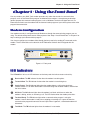
Modem Configuration ......................................................................................... 12
LED Indicators ................................................................................................... 12
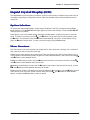
Liquid Crystal Display (LCD) .............................................................................. 13
Option Selection .......................................................................................... 13
Menu Structure ............................................................................................ 13
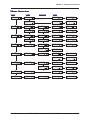
Menu Overview .................................................................................................. 14
Status Trunk ................................................................................................. 15
Basic Options Trunk ..................................................................................... 16
Advanced Options Trunk .............................................................................. 18
Remote Configuration Options Trunk ........................................................... 20
Diagnostic Options Trunk ............................................................................. 20
Phone Number Memory Options Trunk ........................................................ 21
Caller ID Options Trunk ................................................................................ 21
Menu Options .............................................................................................. 22
Status .......................................................................................................... 22
Basic Options .............................................................................................. 23
Advanced Options ....................................................................................... 25
Remote Configuration Options ..................................................................... 27
Diagnostic Options ...................................................................................... 27
Phone Number Memory Options ................................................................. 27
Caller ID Options ......................................................................................... 28
Chapter 4 - Leased Line Operation .......................................................................... 29
Two-Wire Setup ................................................................................................. 29
Four-Wire Setup ................................................................................................. 30
Dial Backup and Leased-Line Restoral .............................................................. 31
Dial Backup and Leased Line Restoral Setup .................................................... 31
Chapter 5 - Remote Configuration ............................................................................ 33
Basic Procedure ................................................................................................. 33
Setup ................................................................................................................. 33
Changing the Remote Configuration Password .................................................. 33
Changing the Remote Escape Character ........................................................... 34
Chapter 6 - Callback Security ................................................................................... 35
Setup Procedures .............................................................................................. 35
Turning Callback Security On and Off ................................................................ 35
Assigning Callback Passwords .......................................................................... 36
Calling Procedure .............................................................................................. 38
Callback Security Commands ............................................................................ 39
Callback Assignments Form .............................................................................. 40
Multi-Tech Systems, Inc. MT5600BA/BL Series User Guide (S000276E)
3