1
NETWORKSUPERVISION
Cabling Infrastructure Tools - Copper
Industrial Networks
What are they? How do they affect you?
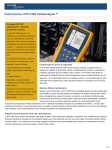
DTX CableAnalyzer™
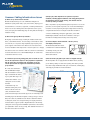
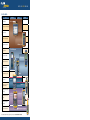
Network systems are rapidly automating more and more of today’s factories and plants, controlling
A cable testing platform for harsh environments
tasks such as data gathering, process control, and production automation. This is because systems are
DTX CableAnalyzer is the only cable tester that can completely certify
migrating from analog to digital networked standards such as:
copper across datacenter and industrial cabling. Only the DTX platform
• ASI, MODBus, RS-485 or RS-232 derivatives
offers optional on-board M12 modules for testing industrial-strength
• DeviceNet, a CAN bus derivative
components. The DTX can be used for certification and troubleshooting
• Fieldbus Foundation, TCP/IP based
and provides unparalleled ease of use, installer-friendly features, and
• ProfiBus, TCP/IP based
• Ethernet, TCP/IP based
Cabling Infrastructure Tools - Fiber
• Qualify whether or not your existing
cabling has the bandwidth to support
10/100 or Gigabit Ethernet
Fiber troubleshooting solution for your most
critical network cabling.
• Troubleshoot why existing cabling
cannot support the network’s bandwidth
requirement (e.g. crosstalk at 11 meters)
SimpliFiber® Pro Optical Power Meter
and Fiber Test Kits
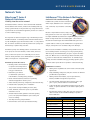
Unlike a Power Meter and light source, an OTDR sees the performance
Measure end-to-end loss with a Power Meter
and source
of individual connectors and splices on a fiber link. It also is the most
Your industrial networks depend on a reliable fiber optic infrastructure.
powerful troubleshooting tool for fiber optics because 1) it is single
Proper installation and maintenance of fiber cabling is imperative for
minimizing network – and subsequently production - downtime. Wheth-
an intuitive user interface. The DTX is the industry-leading certification
• Discover what is at the end of any cable and display device
configuration (speed/duplex/pairing)
ended; you don’t need a far-end device or another technician working
with you, and 2) it shows distance to faults and characterizes every
tool for network owners and maintenance engineers alike and is well
er you require basic fiber verification capabilities, advanced trouble-
• Identify unused switch ports that can be reallocated
event within the link. An OTDR tells you loss and reflectance at every
shooting and inspection, or documented loss and power measurements,
• Graphically map wiring configuration and show
distance-to-faults with Intelligent Wiremap feature
event. Without an OTDR you would not even know there is an event
Fluke Networks’ SimpliFiber® Pro Optical Power Meter and Fiber Test
there.
Kits are the best first-line fiber instruments to meet your needs.
MicroScanner2 Cable Verifier
OptiFiber enables users of all experience levels to certify fiber to
With new advanced capabilities that make testing simple, SimpliFiber
Streamline verification testing and rule out
service problems fast
customer specifications and new industry standards, troubleshoot
Pro is ideal for anyone involved in first-line optical fiber cabling instal-
connection-rich links, and thoroughly document results – therefore,
lation and troubleshooting. Many industry-leading features to help you
improving the health of your fiber network. Your fiber cabling will be
reduce testing time and manpower, including simultaneous dual-wave-
ready and capable to perform for high-bandwidth applications.
length testing and measurement recording, CheckActive™, FindFiber™,
suited for use in an industrial setting.
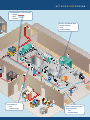
The increasing integration of these technologies onto the plant floor is creating a new set of
OptiFiber™ OTDR
The CableIQ is used to:
The DTX is used to:
challenges as 4 to 20 mA analog control, serial digital control, and industrial networks are all found
• Test cable three times faster
than exiting testers with the
9-second Cat 6 auto-test feature
on the same plant floor. Each technology plays a role in the operation of a plant with the networked
devices controlling:
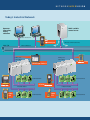
• Managed and unmanaged switches, PCs, routers
• Analyze test results and create
professional test reports using LinkWare
reporting software for documentation
• PLC’s, remote IO, variable frequency drives, motion controllers, sensors, transducers, encoders,
actuators, robot controllers
• Verify the availability of network and IP services using the
Network Service Module
These changes mean a convergence between what had formerly been only thought of as IT issues as
ones that need to be dealt with by people in job functions such as:
The MicroScanner Cable Verifier can rule out a whole host of potential
2
cable and service issues before determining the cause of a connection
problem. MicroScanner gives you high-power vision to verify today’s
most common voice, data, and video services, translating into faster,
more comprehensive troubleshooting.
• Plant Operations
• Industrial Automation
CableIQ™ Qualification Tester
• Industrial Maintenance
• Field Service
Your vision into cabling bandwidth
• Process Control
• Control Engineer
CableIQ is a front-line cable troubleshooting tool that gives even the
most novice tech the vision to see what speeds existing cabling can
support, quickly isolate cabling from network problems, and discover
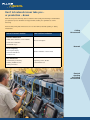
Industrial networks are found in virtually every industry:
what is at the far end of any cable, reducing escalated problems by as
All of this means that minimizing downtime has gotten more complicated. New tools are needed to
much as 30%. Is the port active? Are the duplex settings matched? Is
identify, troubleshoot, and resolve industrial network problems. Industrial networks can present many
This cable verification tool starts by taking results from what was four
different test modes and displays them all at once – graphic wiremap,
pair lengths, distance to fault, cable ID, and far-end devices. The end
result is reduced troubleshooting time and fewer errors.
The MicroScanner2 is used to:
it a network problem or a cable problem? Can the cable support the
symptoms, but by asking the right questions and using the right tools, troubleshooting can be made
required network bandwidth? CableIQ is the only tool that can answer
easy. It is invaluable to be able to see into your network and assess where the problem is. Often, time
all these questions before, solving issues immediately and minimizing
is spent calling an “expert” to troubleshoot problems that could be solved quickly by the first
production downtime.
responder. Fluke and Fluke Network tools are intuitive and easy-to-use and allow industrial techni-
and Min/Max function.
2
• Perform inspection, verification,
certification, troubleshooting,
and documentation of fiber
cabling in a single, easy-touse tool
• Save time and money when
diagnosing fiber cabling
problems that are causing
network performance issues
The SimpliFiber Pro Kits are used to:
• Verify optical loss and
power levels
• Ensure smooth, clean fiber
connections for maximum
performance
• Verify and locate faults
• Easily locate and eliminate
fiber problems
• Test all common media types, including RJ11,
RJ-45, and coax with no need for adapters
450
The OptiFiber is used to:
°F
• Graphically display wiremap, length,
cable ID, and distance to fault
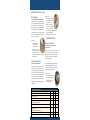
Cabling Infrastructure Tools - Fiber Comparison
cians to solve a broad range of industrial network problems with little or no training.
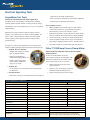
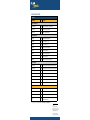
Cabling Infrastructure (Copper) Tools Comparison
Control Room with
Application Server or DCS
Fiber types supported
OptiFiber
SimpliFiber Pro
Multimode, Singlemode
Multimode, Singlemode
DTX
CableIQ
MicroScanner2
Fiber end-face inspection
3
3
Continuity and wiremap testing
3
3
3
Indentifies faults/breaks
3
3
Measures distance to a break or short
3
3
3
Finds location of faults/breaks
3
Verifies optical power/fiber link loss
3
3
Dual-wavelength testing
3
3
Basic (Tier 1) loss test
3
3
Dual fiber-loss testing
3
Measures distance to connection fault
3
Measures distance to performance defect (NEXT, RL), identifies corrective actions and
graphically displays crosstalk and impedance behavior
3
Verifies whether existing cable can support network speed (e.g., 10BASE-T, 100BASE-TX, GBE)
3
3
Extended (Tier 2) OTDR test
Identifies whether or not your new cabling complies with performance requirements of TIA/ISO standards
(e.g., category 5e, 6, Class E)?
Provides pass/fail results compliant to TIA/ISO standards
3
Source type
Documents and prints full reports with measurement data (Pass/Fail, MHz, dB measurements, etc)
3
Required to receive warranty from connector and cabling OEMs
3
3
LED, FP, laser
LED, FP, laser
Pass/fail results
Documents test results
3
3
Single-ended test
3