1
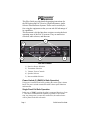
Dual Panel Fail Safe Operation
In a dual installation, the PAC24 designated as Pilot’s at installation,
will default to Com 1. The audio panel designated as copilot will not
operate in the off position. This prevents compromising the pilot’s audio capability in the event of a dual audio panel problem.
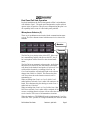
Microphone Selector (2)
There are 10 pushbuttons associated with the communications transceivers. The lower buttons control which transceiver is selected for
transmit.
Receive
Transmit
The PAC24 gives priority to the pilot’s PTT. If the copilot it transmitting, and the pilot presses his PTT, the pilot’s microphone will be heard over the selected transmitter.
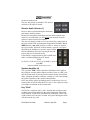
The PAC24 has an automatic selector mode. Audio from
the transceiver selected by the Xmit button is automatically heard in the headsets and speaker (if selected). You
can check this function by switching from COM 1 to
COM 2 and watch the selected audio light on the selector
change from COM 1 to COM 2. This ensures the pilot
will always hear the audio from the transceiver he is
transmitting on.
When switching from COM 1 to COM 2, while COM 2
audio had been selected, Com 1 audio will continue to be
heard. This eliminates the pilot having to switch Com 1
audio back on, if desired.
When switching from COM 1 to COM 2 while Com 2 has
NOT been selected, Com 1 audio will be switched off. In
essence, switching the mic selector will not effect the selection of Com
receiver audio. This is true of all transmitter selections.
When the duplex, or TELEPHONE mode is implemented, Com 5 becomes the “TEL” position. In a single installation, the intercom mode
PAC24-Series Pilot Guide
Revision 4, April 2009
Page 3