1
2
Getting Started
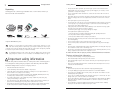
Unpacking
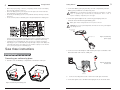
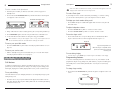
Carefully place the conferencing pod and base unit on a level surface. Ensure you
have received all items shown below.
Se
To
tti
ng
1. ch
up
Sli arg
co
Co de the e
nf
ba
er
pac nne
tte
en
k, ct the cover rie
cin
and
off s
g
slid bat
the
ph
e tery
the pac bat
on
e
cov k ter
er plu y com
bac g
k into partm
int
ent
o the
pla por
ce. t on
the
in
the
bot
com tom
par of
tm the
ent
pod
, ins
.
ert
the
2.
Fig
3.
ure
1.
Co
Con
ele nne
nec
ctr ct
To
ting
ica the
co
1.
and
l out pow
Co nn
cha
let. er
cab nne ect
rgin
Ch sup
of le ct one ba
g
arg ply
se
the
the int
e bat /ch
2. into
o
bat
end un
arg
Co
a bas the
it
ter
ter er
nne wa e uni pho of
y
ies to
3. 2.5
the
ll
for the
Plu mm ct a jac t and ne jac tele
out g
15 con
aud rec k.
the k on pho
let. the
hou fer
io ord
oth the ne
* bas jac ing
rs enc
Th
er
e uni k
pri ing
(if dev
end bac
15 e bas
or
pod
k
t int des ice
0
to
fee e uni
ire to the
*
firs and
o
t fro t
an
d).
A Inte
t use plu
sep rna
ma
ele
m
ara tion
ctr
. g it
the y be
te al
ica
int
pow ver
con loc
l
o
er sion
an
fer ate
ada s
enc d up
pte of
In
ing to
Use
Power
r is the
and
pod
LEDs
incl Ma
ude x Wir
d. eles
s bas
e unit
not
Fig
plu
g
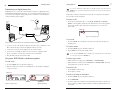
Telephone cord
St
ar
te
d
Gu
id
e
les
s
button
2.
Con
the
Power Cord
ng
W
ire
ure
dire
ctly
into
Base unit
tti
ax
y
Paging
do
Conferencing pod(s)
Ge
M
bat
ter
nec
ting
the
elec
bas
tric
al
e
out
let.
uni
t
Quick start guide
Battery pack(s)
Manual on CD
Power Supply Retainer(s)
Power supply/charger(s)
Figure 1. MAX Wireless parts
ClearOne is not responsible for product damage incurred during shipment. You must
make claims directly with the carrier. Inspect your shipment carefully for obvious signs
of damage. If the shipment appears damaged, retain the original boxes and packing material
for inspection by the carrier. Contact your carrier immediately.
The MAXAttach Wireless model contains two pods, two battery packs, and two power
supply/chargers & retainers. For more information on MAXAttach Wireless, see pg 12.
!
Important safety information
Read the safety instructions before first use of this product.This conferencing phone
is not designed for making emergency telephone calls when the power fails. Make
alternative arrangements for access to emergency services.
• Read and understand all instructions.
• Follow all warnings and instructions marked on the product.
• Unplug this product from the wall outlet before cleaning. Do not use liquid cleaners or
aerosol cleaners. Use a damp cloth for cleaning.
• Do not use this product near water, for example, near a bathtub, washbowl, kitchen sink,
or laundry tub, in a wet basement, or near a swimming pool.
• Do not place this product on an unstable cart, stand, or table. The product may fall,
causing serious damage to the product.
• Slots and openings in the cabinet and the back or bottom are provided for ventilation, to
protect it from overheating, these openings must not be blocked or covered.
• This product should never be placed near or over a radiator or heat register.This product
should not be placed in a built-in installation unless proper ventilation is provided.
Getting Started
3
• This product should be operated only from the type of power source indicated on the
marking label. If you are not sure of the type of power supply in your location, consult
your dealer or local power company.
• Do not overload wall outlets and extension cords as this can result in the risk of fire or
electric shock.
• Never push objects of any kind into this product through cabinet slots as they may touch
dangerous voltage points or short out parts that could result in a risk of fire or electric
shock.
• Never spill liquid of any kind on the product.
• To reduce the risk of electric shock, do not disassemble this product. Opening or removing
covers may expose you to dangerous voltages or other risks. Incorrect reassembly can
cause electric shock during subsequent use.
• Unplug this product from the wall outlet and battery source and refer servicing to qualified service personnel under the following conditions:
a. When the power supply cord or plug is damaged or frayed.
b. If liquid has been spilled into the product.
c. If the product does not operate normally by following the operating instructions.
d. If the product has been dropped or damaged.
e. If the product exhibits a distinct change in performance.
• Avoid using a telephone during an electrical storm. There may be a remote risk of electric
shock from lightning.
• Do not use this product to report a gas leak in the vicinity of the leak.
• Do not use this product near intensive care medical equipment or by persons with pacemakers.
• Due to the radio signals between base station and POD, wearers of hearing aids may experience interference in the form of a humming noise.
• This product can interfere with electrical equipment such as answering machines, TV sets,
radios, computers and microwave ovens if placed too close.
To reduce the risk of fire or injury to persons, read and follow these instructions:
Telephone wiring and jack information
• Use caution when installing or modifying telephone lines.
• Never install telephone wiring during an electrical storm.
• Never install telephone jacks in wet locations unless the jack is specifically designed for
wet locations.
• Never touch uninsulated telephone wires or terminals unless the telephone line is disconnected at the network interface.
Batteries
• Disconnect the product from wall outlet when replacing the battery pack.
• Use only the battery pack type listed in this manual. Do not use lithium batteries.
• Do not dispose of the battery pack in a fire, as they can explode. Check with local codes
for battery disposal regulations.
• Do not open or mutilate the battery pack. Released electrolyte is corrosive and can cause
damage to the eyes or skin. It can be toxic if swallowed.
• Avoid contact with rings, bracelets, keys or other metal objects when handling the battery
pack. These objects could short out the batteries or cause the conductor to overheat,
resulting in burns.
• Do not attempt to recharge the battery pack by heating it. Sudden release of battery
electrolyte can cause burns or irritation to the eyes or skin.