1
QUICKSTART GUIDE
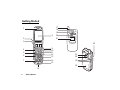
2: NAVIGATION
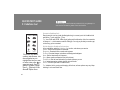
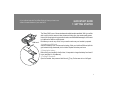
The GX20 has many features, but exploring and using them is simple,
thanks to the 5-way central navigation key and the contextual
softkeys.
G
Camera
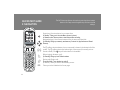
(Centre key): Use to select an icon or menu item.
In Standby: Takes you to the main Menu (shown in phone).
In Camera mode: Takes a picture or starts/stops video recording.
(Navigation keys): Use to move between icons in menus and item lists.
(In Standby): Brings up commonly used menus (Contacts List, Applications and Saved
Pictures).
Exit
Select
AC
by SHARP
ii
The A softkey selects whatever icon or command is shown in the bottom left of the
screen. The C softkey selects the bottom right of the screen (this usually acts as
Cancel or Back.) The
key will select what’s in the middle.
D
(When ringing): Answers a call.
(In Standby): Brings up Last Dialled numbers.
F
(During call): Ends a call.
(Press and hold): Turns handset on and off.
(In menus): Takes you back to the Standby screen.
E
Takes you to the Vodafone live! home page.