1
I
I
SETTING UP
A Note on Stereo
(continued)
~"""""""""""""""""~
~~
~ 0J;;IVHF OUT
~ .4'\AUDIO 1 OUT
~~
s AS.\
~VAUDIO 2 OUT
Ant. or
~ Cab1le
VHF INcQJ ~~
~
~
s
~
~t5.\
VCR~~
~ \!U VIDEO OUT
s..""""""""""""""""",\
VMIV CH':
123
[L]
AUD
EJ
6) ~ ~
AF OUT
RF IN
AUDIO IN
e
VIDEO IN
1m
AC
•
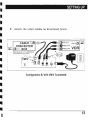
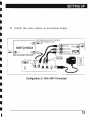
Configuration 0, With VMIV and Stereo
I
I
I
•
When the Y-connectors have been installed, you will have
two different sets of input to the 1V. Your 1V probably
has a switch in the front panel for choosing between these
input options. To operate the VMIV, you will set the 1V to
ANT IN, VHF IN, 1V IN, or RF IN, and you can simply
switch to EXT IN or VIDEO IN for normal stereo
operation.
19