1
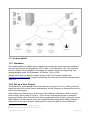
1 Introduction The Reflector service is a way for Broadcasters to quickly and easily set up a unidirectional STL (Studio to Transmitter Links), without all the complexities of configuring IP networks, or punching holes through firewalls: no specialist IT knowledge is required to set up and use the service. The service can also be used for Remote Contribution and Syndication with no extra configuration. Barix hardware devices being used with the Reflector service must have the Barix STL firmware version FIXME loaded. The Beta versions of the Reflector client will operate in the Production environment, but will not support the new features introduced as a result of the Beta trial. The Barix STL firmware is preloaded on the Exstreamer 500 and 1000 series devices, where the Reflector functionality is 'dual boot' with the more complex STL application. Other suitable Barix hardware can have the STL firmware loaded on to them to enable use with the Reflector service. 1.1 How does it work? The Reflector Service is a subscription system, a User requires a User ID in order to be able to use it. These can be obtained via the 'Request an Account' functionality on the Reflector Service homepage. The Reflector Service only operates with devices that have been defined to it. A User must therefore set up a Project containing the details of all the Devices. Each project needs a Sending Device (Encoder) and Receiving Device(s) - Decoders - at the transmitter(s) / affiliates. Requests from unregistered devices are ignored. The main components of the Reflector are shown in the diagram: Database – stores all data about accounts, projects and devices Configuration server – assigns project devices to individual Reflector Servers and communicates configuration details to devices Reflector server(s) – receive details of devices from the config server and handle communications with them; receiving the network audio stream from the Encoder and forwarding it to the Decoder(s) Web server – handles the User Interface, allowing users to set up and maintain their projects, updating the database accordingly. Encoder/Decoders. On startup, each Reflector Client device will contact the Reflector Services defined to it in its startup configuration (US / EU ...), requesting the details of its project configuration, it then contacts the appropriate Configuration Server, applies its configuration and operates accordingly. Barix Reflector User Guide.doc Page 3 of 22