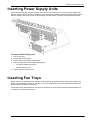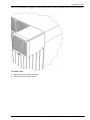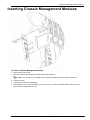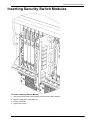
1
Important Information Latest Software We recommend that you install the most recent software release to stay up-to-date with the latest functional improvements, stability fixes, security enhancements and protection against new and evolving attacks. Latest Documentation The latest version of this document is at: http://supportcontent.checkpoint.com/documentation_download?ID=12557 For additional technical information, visit the Check Point Support Center (http://supportcenter.checkpoint.com). Revision History Date Description 08-Nov-11 First release of this document Feedback Check Point is engaged in a continuous effort to improve its documentation. Please help us by sending your comments (mailto:cp_techpub_feedback@checkpoint.com?subject=Feedback on Check Point 61000 Security System Getting Started Guide). Health and Safety Information Read the these warnings before setting up or using the appliance. Warning Do not block air vents. This is to ensure sufficient airflow for the individual SGMs in the chassis. This appliance does not contain any user-serviceable parts. Do not remove any covers or attempt to gain access to the inside of the product. Opening the device or modifying it in any way has the risk of personal injury and will void your warranty. The following instructions are for trained service personnel only. Handle SGM system parts carefully to prevent damage. These measures are sufficient to protect your equipment from static electricity discharge: When handling components (Fans, CMMS, SGMS, PSUs, SSMs) use a grounded wrist-strap designed for static discharge elimination. Touch a grounded metal object before removing the board from the antistatic bag. Hold the board by its edges only. Do not touch its components, peripheral chips, memory modules or gold contacts. When holding memory modules, do not touch their pins or gold edge fingers. Restore SGMs to the anti-static bag when they are not in use or not installed in the chassis. Some circuitry on the SGM can continue operating after the power is switched off. Do not let the lithium battery cell (used to power the real-time clock on the CMM) short. The battery can heat up and become a burn hazard.