1
Introduction
Before you begin to use the drive there are a few important things to learn about your new product.
Controls, Connectors and Indicators
First familiarize yourself with the features of the unit.
Front Panel Area
The front panel contains only the Activity LED. The circular blue LED will come on to indicate the power-on
state. The LED will flash during data access.
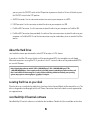
Rear Panel Area
Along the rear panel you will find the ON/OFF switch and interface connectors. Refer to the picture below.
1
2
3
4
5
6
1. AC Power Cord Connector. Connect the supplied power cord to this connector.
2. ON/OFF Switch. Once the AC power cord has been properly connected to the drive and an AC outlet,
3