1
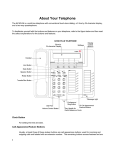
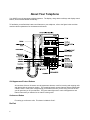
The standard 12-button pad for dialing phone numbers and accessing features. The letters "Q" and
"Z" have been added to the appropriate dial pad keys for directory access, and the "5" button on your
dial pad has raised bars for visually impaired users.
Display
A built-in 2-line by 24-character display.
Display Control Buttons
These four buttons are labeled <Menu>, <Exit>, <Prev>, and <Next>.
<Menu> is used to enter Softkey Mode and access the first feature option screen.
<Exit> is used for exiting the Display Mode and returning to Normal Mode.
<Prev> and <Next> can be used to help you go back and forth through the feature option
screens.
Drop Button
For disconnecting from a call or dropping the last party added to a conference call.
Handset
A handset is provided for placing and answering calls. This is sometimes called the "receiver". In
most cases, you must lift the handset (go off-hook) or activate the speaker or speakerphone before
you can use a feature.
Handset Jack
Located on the back of your telephone, this jack is used for connecting the handset to your
telephone.
Hold/Ring Button
A red button for putting a call on hold. By pressing <Shift> and then <Hold>, you can select a
personalized ring for your telephone from eight possible ringing patterns.
Line Jack
This jack is used for connecting a line cord to your telephone. Located on the back of your
telephone, this jack is labeled "LINE".
Message Light
A red light that goes on when a message has been left for you.
Mute Button
For turning off the microphone associated with the handset or the built-in speakerphone so the other
person on the call cannot hear you.
Shift Button
2