1
Connecting to a Network
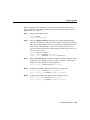
Step 4
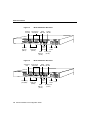
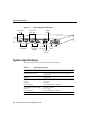
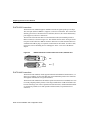
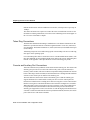
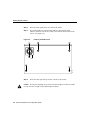
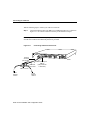
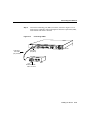
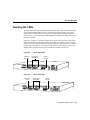
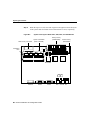
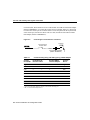
Connect the ISDN BRI port (RJ-45) to an NT1 device. (See Figure 3-14.)
Figure 3-14
Connecting an NT1 Device
ISDN BRI port (RJ-45)
SERIAL 4 (A/S)
SERIAL 0
SERIAL 5 (A/S)
SERIAL 1
SERIAL 6 (A/S)
SERIAL 2 (A/S)
SERIAL 7 (A/S)
SERIAL 3 (A/S)
LINK SERIAL 8 (A/S)
ETHERNET 0
AUI
ACT
10bT
BRI 0
Input: 100-240VAC
Freq: 50/60HZ
Current: 1.2-0.6 A
Watts: 40W
PWR
SERIAL 9 (A/S)
CONSOLE
AUX
Router
H6574
Straight-through
RJ-45-to-RJ-45 cable
NT1 device
S/T interface
Step 5
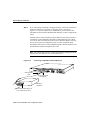
Connect the power cable to the router and the power source.
Installing the Router 3-17