1
Console and Auxiliary Port Signals and Pinouts
Console Port Signals and Pinouts
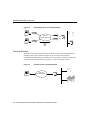
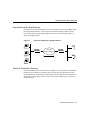
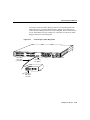
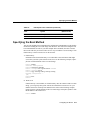
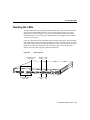
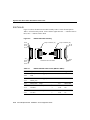
Use the thin, flat, RJ-45-to-RJ-45 roll-over cable and RJ-45-to-DB-9 female DTE adapter
(labeled “TERMINAL”) to connect the console port to a PC running terminal emulation
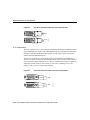
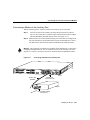
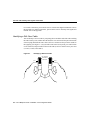
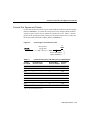
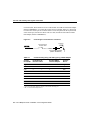
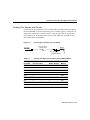
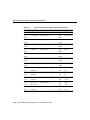
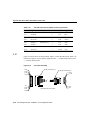
software. Figure C-2 shows how to connect the console port to a PC. Table C-1 lists the
pinouts for the asynchronous serial console port, the RJ-45-to-RJ-45 roll-over cable, and
the RJ-45-to-DB-9 female DTE adapter (labeled “TERMINAL”).
Figure C-2
Connecting the Console Port to a PC
PC
RJ-45-to-RJ-45
roll-over cable
RJ-45-to-DB-9 adapter
(labeled “TERMINAL”)
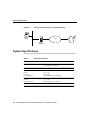
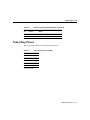
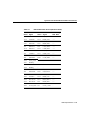
Table C-1
H7226
Router
Console Port Signaling and Cabling Using a DB-9 Adapter
Console
Port (DTE)
RJ-45-to-RJ-45
Roll-Over Cable
RJ-45-to-DB-9
Terminal Adapter
Console
Device
Signal
RJ-45 Pin
RJ-45 Pin
DB-9 Pin
Signal
RTS
11
8
8
CTS
DTR
2
7
6
DSR
TxD
3
6
2
RxD
GND
4
5
5
GND
GND
5
4
5
GND
RxD
6
3
3
TxD
DSR
7
2
4
DTR
CTS
81
1
7
RTS
1. Pin 1 is connected internally to Pin 8.
Cable Specifications C-3