1
4.
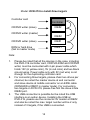
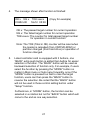
The message shown after function is finished:
OK x NG x TOK xxxxx
C3852+00
16x12 05:38
(Copy for example)
OK x: The passed target number for current operation
NG x: The failed target number for current operation
TOK xxxxx: The counter for total passed target number
for operation in current function
Note: The TOK (Total in OK) counter will be reset when
the master is reloaded (from CD/DVD-ROM) or
partition changed (from hard drive) or operation of
function changed.
5.
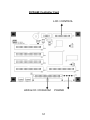
Latest controller card is equipped with 3 buttons, one
“BACK” extra push button is added than before for easier
selection of function. The “BACK” button will be used as
backward selection of function only. For example, if users
select the function by pressing the “MODE” button no
matter in Main menu or Sub menu forwardly, once if the
“MODE” button is pressed too fast to miss the target
function, users can then press the “BACK” button to
reverse the selection. Be noted that the “BACK” button
will not be used in those control setting built-in under
“Setup” function.
Furthermore, in “MODE” button, the function can be
selected in a rotation but not for “BACK” button which will
come to the end as one way selection.
21