1
Installation, Administration and Maintenance
Table of contents
1
OVERVIEW............................................................................................................................................4
1.1 PURPOSE ......................................................................................................................................4
1.2 DECLARATION OF CONFORMITY ......................................................................................................4
1.3 ABBREVIATIONS AND DEFINITIONS ...................................................................................................4
1.3.1 Abbreviations ..................................................................................................................4
1.3.2 Definitions .......................................................................................................................4
1.4 REFERENCES.................................................................................................................................7
2
INTRODUCTION ...................................................................................................................................8
2.1 ABOUT THE DECTOVERIP USING SIP SOLUTION .............................................................................8
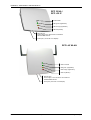
2.2 ABOUT THE ACCESS POINTS (RFPS’) .............................................................................................9
2.3 OPENMOBILITY MANAGER ............................................................................................................12
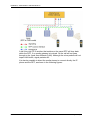
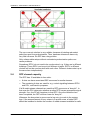
2.4 IP SIGNALLING AND MEDIA STREAM ...............................................................................................12
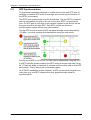
2.5 RFP SYNCHRONIZATION ..............................................................................................................16
2.6 RFP CHANNEL CAPACITY..............................................................................................................17
2.7 ABOUT THE PORTABLE PARTS ......................................................................................................18
2.8 SYSTEM CAPACITIES ....................................................................................................................18
3
INSTALLATION AND CONFIGURATION ..........................................................................................19
3.1 OPENMOBILITY START UP .............................................................................................................19
3.1.1 Start up of the RFPs’ ....................................................................................................19
3.1.1.1
3.1.2
3.1.3
3.1.3.1
3.1.3.1.1
3.1.3.1.2
3.1.3.1.3
3.1.3.2
3.1.4
Booter update ........................................................................................................... 24
Each application SW comes with the latest released booter SW. The application SW
will update the booter automatically. Selecting the right DHCP server ..................... 24
3.1.5 RFP LED status ............................................................................................................24
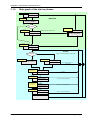
3.1.6 State graph of the start up phases ...............................................................................27
STATIC LOCAL CONFIGURATION OF A RFP .....................................................................................28
CONFIGURING THE OPENMOBILITY MANAGER ...............................................................................33
3.3.1 Service Login procedure...............................................................................................33
3.3.2 System ..........................................................................................................................36
3.3.2.1
3.3.2.1.1
3.3.2.1.2
3.3.2.1.3
3.3.2.2
3.3.2.3
3.3.2.4
3.3.2.5
3.3.3
3.3.4
Creating and Changing RFPs’ .................................................................................. 45
New, change and delete button ................................................................................ 45
Import by configuration files...................................................................................... 46
Capture of RFPs’ ...................................................................................................... 47
States of a RFP......................................................................................................... 48
RFP HW type ............................................................................................................ 48
OMM / RFP SW version check ................................................................................. 49
Configuration of Portable Parts ....................................................................................49
3.3.4.1
3.3.4.1.1
3.3.4.1.2
3.3.4.2
3.3.4.2.1
3.3.4.2.2
3.3.4.3
3.3.5
System settings......................................................................................................... 36
Restarting the OMM ................................................................................................. 38
Encryption................................................................................................................. 38
Regulatory domain ................................................................................................... 39
SIP ............................................................................................................................ 39
User account............................................................................................................. 42
Time zones ............................................................................................................... 43
Backup...................................................................................................................... 44
RFP configuration .........................................................................................................45
3.3.3.1
3.3.3.1.1
3.3.3.1.2
3.3.3.1.3
3.3.3.2
3.3.3.3
3.3.3.4
Aastra
DHCP client .............................................................................................................. 20
DHCP request .......................................................................................................... 20
DHCP offer ............................................................................................................... 22
Retries ...................................................................................................................... 22
TFTP client................................................................................................................ 22
Application ....................................................................................................................22
3.1.4.1
3.1.4.2
3.2
3.3
Booting overview....................................................................................................... 19
Start up of the OpenMobility Manager..........................................................................20
Booter ...........................................................................................................................20
Creating and Changing PPs’..................................................................................... 50
New, change and delete button ................................................................................ 50
Import by configuration files...................................................................................... 51
Subscription .............................................................................................................. 52
Subscription with configured IPEI ............................................................................. 53
Wildcard Subscription............................................................................................... 53
Searching within PP list ............................................................................................ 54
WLAN Configuration (RFP L42 WLAN only) ................................................................54
depl-0794/2.0
Page: 2 (95)