1
Installing and Configuring Linux Guest Operating Systems
Linux Support on VMware ESX
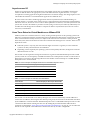
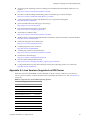
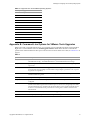
VMware ESX supports the widest range of Linux guest operating systems of any virtualization product. ESX supports Red Hat Enterprise Linux 2.1, 3, 4, and 5, SUSE Linux Enterprise Server 8, 9, and 10, and Ubuntu Linux 7.04, 8.04, and 8.10. In addition, ESX supports almost all updates to these releases as well as specialized variants of them. See “Appendix A: Linux Versions Supported on ESX Server” on page 20 for a listing of Linux versions supported at the time this paper was written. For a complete, up‐to‐date listing of guest operating systems supported by VMware products, see the Guest Operating System Installation Guide. For a link, see “Resources” on page 19. Choosing a Linux distribution from this list offers performance benefits over nonsupported Linux distributions because VMware products optimize hypervisor settings based on guest operating system types.
Installing Linux in a Virtual Machine
When you create the virtual machine in which you plan to install your Linux guest operating system, be sure that its devices are set up as you expect. This section describes the creation of a Linux virtual machine from installable media. Once you have created a virtual machine, you can create templates and clones from the base virtual machine. This enables you to provision future virtual machines quickly. See “Cloning a Linux Guest Operating System” on page 9 for details. For general installation guidelines for all supported Linux distributions, see the Guest Operating System Installation Guide. For a link, see “Resources” on page 19. Memory Recommendations
Be sure the virtual machine is configured with at least 512MB of memory for Red Hat Enterprise Linux 5 or with 256MB of memory for Red Hat Enterprise Linux 3 or Red Hat Enterprise Linux 4. If the memory in the virtual machine is lower than the recommended values, Red Hat Enterprise Linux presents an error message as it loads certain VMware drivers. Network Adapter Recommendations
Be sure to select the correct network adapter. For most 32‐bit guest operating systems, you can select Flexible or Enhanced vmxnet. For most 64‐bit guest operating systems, you can select E1000 or Enhanced vmxnet. Enhanced vmxnet is not supported on every 32‐ and 64‐bit Linux distribution, but if the option exists, we recommend you select Enhanced vmxnet as your network adapter. See “vmxnet” on page 8 for details.
SCSI Adapter Recommendations
When creating the virtual machine, be sure to select the LSI Logic SCSI adapter. Red Hat Enterprise Linux 5 does not include a driver for the BusLogic SCSI adapter. Many Linux guest operating systems encounter problems in a virtual machine configured to use the BusLogic virtual SCSI adapter. In most cases, VMware recommends that you use the LSI Logic virtual SCSI adapter with all Red Hat guest operating systems. However, ESX Server 2.5.2, 2.5.3, 2.5.4, and 2.5.5 support only the BusLogic SCSI adapter. VMware provides a separate BusLogic driver for Red Hat Enterprise Linux 4 Upgrades 1, 2, 3, 4, and 5. For instructions on downloading and installing a driver for the BusLogic adapter, see Archives for VMware ESX Server 2.x. For a link, see “Resources” on page 19. You can install Red Hat Enterprise Linux 5 in a virtual machine using the standard Red Hat distribution CD, via the boot floppy/network method, or from a PXE server. If you plan to use a PXE server to install the guest operating system over a network connection, you do not need the operating system installation media. When you power on the virtual machine, the virtual machine detects the PXE server. For more details on installation through PXE, see the VMware knowledge base article “Using PXE (Preboot Execution Environment) to Install Guest Operating Systems over a Network.” For a link, see “Resources” on page 19. Copyright © 2008 VMware, Inc. All rights reserved.
2