1
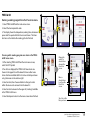
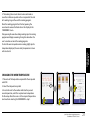
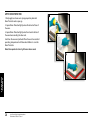
6. The cooking timer counts down to zero and makes a
sound to indicate an operator action is required at the end
of a cooking stage or the end of a cooking program.
Once the cooking program has finished, opening the
oven door to remove the food returns the display to the
‘COOKBOOK’ screen.
Note; opening the oven door during cooking stops the cooking
program and displays a warning. Closing the door allows the
user to continue or cancel the cooking program.
OPERATION &
CONTROLS
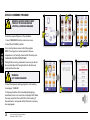
To check the oven temperature when cooking, lightly tap the
temperature displayed, the oven cavity temperature is shown
with an asterisk.
CHANGING THE OVEN TEMPERATURE
1
2
3
1. Take note of the temperature required for the recipe and
select OK.
2. Select the temperature symbol.
3. An asterisk next to the number indicates the present
oven temperature, select the required oven temperature
for the recipe. Once the oven is at the required temperature
continue from selecting the ‘COOKBOOK’ in step 1.
Quick Service Guide original instructions
Part Number 32Z3802 US Issue 1
21