1
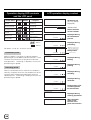
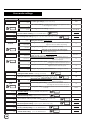
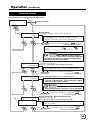
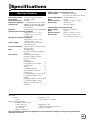
User mode settings
Main menu
Submenu
>>Counter
>Display>
Factory setting
Total
3 counter type settings: [Total, Head, Free]
To t a l
Display mode
>>Contrast
-2
See p. 27
LCD contrast setting: 7 gradations from –3 to +3, the higher the value
the stronger the contrast.
LCD background color setting: 8 options
>>Back Color
SKY BLUE
BLUE
OK?
Counter reset mode
For free counter resetting: press the ENTER button.
OK?
Cleaning mode
For cleaning mode setting: Magnetic head and card feeder roller execution
>Counter Reset
>Cleaning>
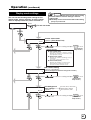
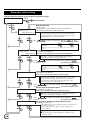
>Ink>
> > I n k Ty p e
See p. 28
See p. 28
YMCK : 0
Setting the ink ribbon: set the ink type
YMCK:0
>>Black Level
Ink mode
0(Standard)
>>Black Mode
Setting the black value K: 7 gradations can be set from –3 to +3, the
larger the value the darker the printing.
>>SP-Ink 2 Level
-3
> > M e d i a Ty p e
Standard:0
> > Te m p . L e v e l
0(Standard)
See p. 30
Standard
Setting the K printing mode: 2 options [standard and fine]
>>SP-Ink 1
Retransfer mode
Setting the special ink SP-Ink 1, SP-Ink2 darkness:
7 gradations can be set from –3 to +3, the larger the
value the darker the printing.
Setting the retransfer film: setting the film type
[1000, 250,750] - three types
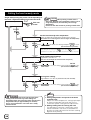
Setting the retransfer roller temperature:
8 gradations can be set
from –5 to +2, the larger the value the
higher the temperature.
Off
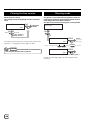
>Bend Remedy>
Bend Remedy
mode
See p. 32
-2
Setting the rear retransfer speed: 5 gradations can be set from –2 to +2, the
larger the value the faster the speed.
+2
Setting the way of peeling off the retransfer film: 2 settings [on and off]
Buzzer mode
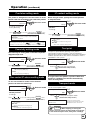
Setting the buzzer ON/OFF: 2 settings [on and off]
>>Speed
-2
>>Cooling Time
Standard
> M G I S O Ty p e
Lo-Co
>IC Antenna Pos.
None
>Ic Contact Pos.
None
26
Off
+2
Cooling time setting: 16 gradations can be set: none and 1–15 (units
seconds).
None
Card setting mode:
Card Size setting: 2 options [Standard and Cybernetic]
See p. 33
Standard
Coercivity setting mode:
ISO card coercivity setting: 2 options [Lo-Co and Ho-Co]
See p. 33
Hi-Co
Non-contact IC antenna setting mode:
Non-contact IC antenna position setting:3 options [None, Ext. Unit,
Added on]
See p. 33
IC contact position setting mode:
IC contact position setting: 3 options [None, Built-in, Ext. Unit]
See p. 33
Test print mode:
to carry out test printing: press the ENTER button.
See p. 33
Transfer Mode:
Transfer mode setting:
See p. 33
OK?
Tr a n s p o r t m o d e
Off
Bend remedy speed setting: 5 gradations can be set from –2 to +2,
the larger the value the faster the speed.
OK?
> Te s t P r i n t
Off
On
See p. 31
Power saving mode
Setting the time for the power saving mode: 9 options [off, 5, 10, 15, 20, 25,
See p. 31
30, 45 and 60] (units: minutes)
Bend remedy roller temperature setting: 9 gradations can be set from –5 to
> > Te m p L e v e l
+2 or off, the larger the value the
off
higher the temperature.
-2
>Card Size
+1
+2
Off
>Power Saving
Standard : 0
Setting the retransfer speed: 5 gradations can be set from –2 to +2,
the larger the value the faster the speed.
>>MG Print (JIS)
On
0
-2
>>Speed (Front)
>>Speed (Back)
>Buzzer
0
Standard
See p.29
>Retransfer>
0
press the ENTER button.