1
Basic Operation (Continued)
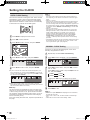
Changing Channels
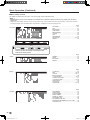
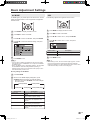
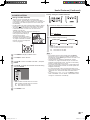
Selecting Menu Items
The menus can be used to adjust the various settings of the
LCD TV set. Select the desired menu item by following the
steps below. See the next page for each Menu screen.
A
• The items displayed differ depending on the setting conditions.
• The item selected is displayed in yellow.
• Settings most recently adjusted will be saved in memory.
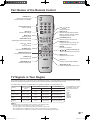
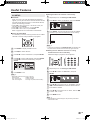
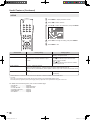
You can select channels using Channel Select or
CH ( )/( ).
■ Using the remote control
• This LCD TV set allows you to select up to 125 channels
(1 to 125). To select a channel, enter a 2- or 3-digit number.
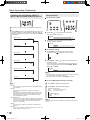
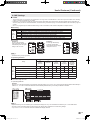
■ Using Channel Select
When selecting the channel using Channel Select,
complete input of the channel number by holding down the
button for the last digit for a moment.
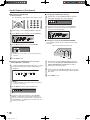
To select a 1- or 2-digit channel number (e.g., Channel 5):
Complete the following procedure within 4 seconds.
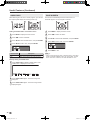
1
Press the
button.
0–
2
Press the
button.
5
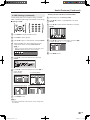
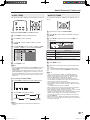
1
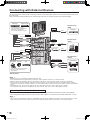
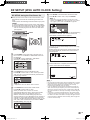
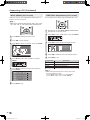
Press MENU on the remote control to display the Menu
screen.
2
Press \/| to select the desired menu item.
• The cursor moves left or right.
• The cursor indicates the selected menu item.
3
Press '/" to select the desired item, and press \/|
to adjust the selected item.
• For “AV MODE”, “OPC”, “ADVANCED” and “RESET”,
press ENTER to display the setting screen.
A
• When selecting a 1-digit channel number, do not fail to press the
button first.
PICTURE� AUDIO���SETUP����OPTION
AV�MODE���[DYNAMI
OPC�������[OFF]
B A C K L I G H T � [ BRIGHT�]
0 ]
CONTRAST��[�4�
BRIGHTNESS[���
0 ]ミ�
COLOR�����[+�5]ミ�
TINT������[�� 0 ]
SHARPNESS�[���
0 ]ミ�
ADVANCED
RESET
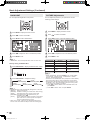
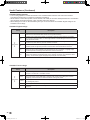
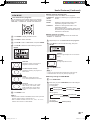
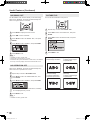
To select a 3-digit channel number (e.g., Channel 115):
Complete the following procedure within 4 seconds.
1
Press the
3
Press the
button.
1––
2
Press the
button.
11–
4
button.
115
Air:
�������+
�������+
�������+
Press MENU RETURN to return to the previous screen,
or press MENU to exit.
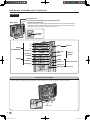
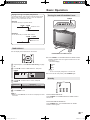
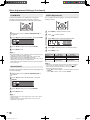
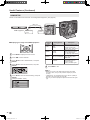
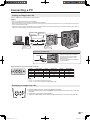
■ Using the control panel of the main unit
A
• The 3-digit channel number can be selected only when the
receiving mode is set to “CABLE” in “CH SETUP”. (For details on
setting the receiving mode, see page 25.)
Changing channels with CH (
C]
)/(
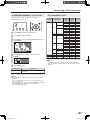
You can also operate the menu with the control panel of the
main unit.
Button operations on the control panel correspond to the
ones on the remote control as shown below.
Control panel of the main unit
) on the remote control
Press CH ( ) and the channels change in the order shown below:
2 → 3 → . . . → 68 → 69 → 2 → 3 → . . .
Press CH ( ) and the channels change in the order shown below:
3 → 2 → 69 → 68 → . . . → 3 → 2 → . . .
Cable: Press CH ( ) and the channels change in the order shown below:
1 → 2 → 3 → . . . → 125 → 1 → 2 → 3 → . . .
Press CH ( ) and the channels change in the order shown below:
3 → 2 → 1 → 125 → . . . → 3 → 2 → 1 → . . .
VOL ( – )/(+): Cursor \/| on the remote control
CH ( )/( ): Cursor "/' on the remote control
MENU: MENU on the remote control
INPUT: ENTER on the remote control
■ Using FLASHBACK
● Press FLASHBACK to switch the currently tuned
channel to the previously tuned channel.
● Press FLASHBACK again to switch back to the currently
tuned channel.
19
LC-20D30U_E_book.indb
19
2005/12/15
11:26:41