1
Basic Adjustment Settings
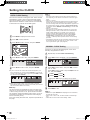
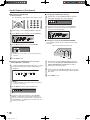
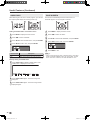
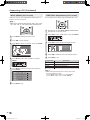
AV MODE
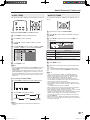
OPC
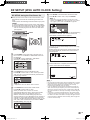
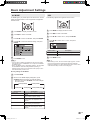
AV MODE gives you preset options to choose from, to best
match the image based on room-brightness and playback
software used.
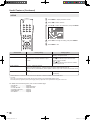
1
Press MENU to display the Menu screen.
2
Press \/| to select “PICTURE”.
3
Press '/" to select “AV MODE”, and press ENTER.
4
Press '/" to select the desired setting, and press
ENTER.
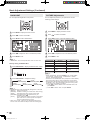
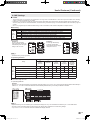
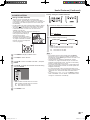
Automatically adjusts the brightness of the screen.
1
Press MENU to display the Menu screen.
2
Press \/| to select “PICTURE”.
3
Press '/" to select “OPC”, and press ENTER.
4
Press '/" to select “ON” or “OFF”, and press
ENTER.
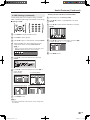
��ON
�
��OFF
��STANDARD
��DYNAMIC
��DYNAMIC(FIXED)
Selected item
��MOVIE
��GAME
5
Automatically adjusts the brightness
OFF
No adjustment
5
Press MENU to exit.
A
• You can select a different AV MODE item for each input mode.
(For example, select “STANDARD” for TV input and “DYNAMIC”
for VIDEO input.)
• When “AV MODE” is set to “DYNAMIC (FIXED)”, “NO PICTURE
ADJUSTMENTS AVAILABLE IN [DYNAMIC (FIXED)].” is
displayed and the items in the PICTURE screen (except “OPC”
and “ADVANCED”) cannot be set.
Description
ON
Press MENU to exit.
A
• When setting to “ON”, the OPC indicator lights up green, senses
the surrounding light and automatically adjusts the backlight
brightness. Make sure no object obstructs the OPC sensor, which
could affect its ability to sense surrounding light.
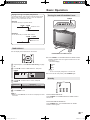
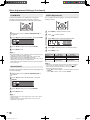
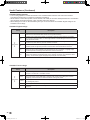
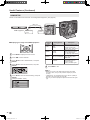
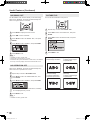
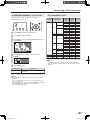
Directly setting the AV MODE
1
2
Press AV MODE.
Before the AV MODE display disappears, press
AV MODE again and select your desired setting.
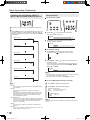
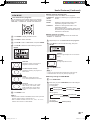
• Each time you press AV MODE, the mode changes
as shown below.
AV MODE [STANDARD]
AV MODE [GAME]
Selected item
AV MODE [MOVIE]
AV MODE [DYNAMIC]
AV MODE [DYNAMIC (FIXED)]
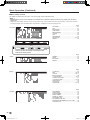
Description
STANDARD
Changing image settings to standard
values.
DYNAMIC
For a clear-cut image emphasizing
high contrast for sports viewing.
DYNAMIC (FIXED)
Changing image settings to factory
preset values. No adjustments are
allowed.
MOVIE
Controlling the contrast to enable
easier viewing of dark images.
GAME
Controlling the brightness of video
games and other images for easier
viewing.
21
LC-20D30U_E_book.indb
21
2005/12/15
11:26:47