1
CONTENTS
Contents
Product Overview .................................................................................................................................................... 5
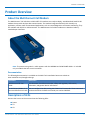
About the MultiConnect Cell Modem........................................................................................................................... 5
Documentation ........................................................................................................................................................... 5
Descriptions of LEDs...................................................................................................................................................... 5
Side Panels .................................................................................................................................................................... 6
Specifications ................................................................................................................................................................ 7
Power Draw MTC-EV3................................................................................................................................................... 9
Dimensions.................................................................................................................................................................. 10
Installing and Using the Device .............................................................................................................................. 11
Installing the Device.................................................................................................................................................... 11
Placing Serial Devices in Power Save Mode.............................................................................................................. 11
USB Cable Recommendations................................................................................................................................... 12
Mounting Device to Flat Surface................................................................................................................................. 12
Using Diversity ............................................................................................................................................................ 12
Antenna and Activation Information...................................................................................................................... 13
Antenna....................................................................................................................................................................... 13
EV-DO and CDMA Antenna Information..................................................................................................................... 13
EV-DO and CDMA Authorized Antennas................................................................................................................... 13
EV-DO and CDMA Antenna Requirements .............................................................................................................. 13
Antenna System Cellular Devices................................................................................................................................ 13
Account Activation for Cellular Devices ..................................................................................................................... 13
Device Phone Number ................................................................................................................................................ 14
Using Linux ............................................................................................................................................................ 15
Shell Commands.......................................................................................................................................................... 15
Testing Serial Ports.................................................................................................................................................... 15
Create a PPP Connection ............................................................................................................................................ 15
Example..................................................................................................................................................................... 15
Configuring and Communicating with Your Device................................................................................................. 17
Interacting with Your Device Overview ...................................................................................................................... 17
Before You Begin......................................................................................................................................................... 17
Using Command Mode and Online Data Mode.......................................................................................................... 17
Verifying Signal Strength............................................................................................................................................. 18
Example .................................................................................................................................................................... 18
Checking Network Registration................................................................................................................................... 19
Sending and Receiving Data........................................................................................................................................ 19
Connecting Device to TCP Server as TCP Client ........................................................................................................ 19
Configuring Device as UDP Listener to Accept UDP Client Connections ................................................................. 19
MultiConnect® Cell 100 Series MTC-EV3 User Guide
3