1
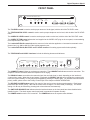
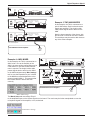
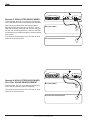
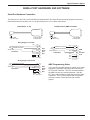
Digital Telephone Hybrid FRONT PANEL LECTROSONICS, INC. RIO RANCHO, NM DIGITAL HYBRID U.S.A. CODEC TELEPHONE RX TX RX LEVEL TRIM LEVEL TX LEVEL LecNet ANTI-ECHO LecNet ANTI-ECHO RX LEVEL TX LEVEL The TX LEVEL control is used to set the proper amount of local signal, with the aid of the TX LEVEL meter. The TELEPHONE RX LEVEL control is used to set the proper telephone receive level, with the aid of the RX LEVEL meter. The CODEC RX LEVEL control is used to set the proper codec receive level, with the aid of the RX LEVEL meter. The CODEC TX TRIM control adjusts the level supplied to the CODEC OUT plug on the rear panel, accommodating level requirements of the codec. The LecNet ANTI-ECHO control adjusts the amount of echo reduction applied to a Lectrosonics automatic micro phone mixer (e.g. AM8 or AM16) via the LecNet expansion port. The LecNet ANTI-ECHO, RX LEVEL and TX LEVEL meters aid in setting system audio levels optimally. The TELEPHONE and CODEC interfaces include the following buttons and indicators. TELEPHONE CONNECT CODEC PRIVACY RECEIVE VOLUME UP DOWN CONNECT PRIVACY RECEIVE VOLUME UP SWITCHES DISABLED DOWN POWER The CONNECT button initiates or terminates a connection. The CONNECT led indicates an active connection. The telephone connect led flashes when the telephone line is ringing. The PRIVACY button mutes either the transmit signal, the received signal, or both, depending on the interface’s current privacy mode. When the privacy feature is engaged, the PRIVACY led flashes to indicate the current privacy mode, then glows steadily. Privacy may be disengaged by pressing the button again. For detailed information about privacy modes, please refer to the Privacy Feature topic in the chapter on BASIC OPERATION. The RECEIVE VOLUME buttons permit fine control of the receive volume during normal operation. Each button press alters the receive gain by 1 dB, and the control offers a range of -12 dB to +6dB (19 settings). The default setting of 0 dB may be restored by pressing both volume buttons simultaneously. The SWITCHES DISABLED led indicates that the interface buttons on the front panel have been disabled at the installer’s option. The wired remote controls and serial commands will operate normally. The POWER switch turns the TH3 on and off. The POWER led serves as a power status indicator. Rio Rancho, NM – USA 3