1
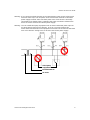
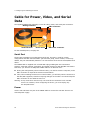
Nextiva S1100w User Guide To power an S1100w device: 1. In 12V DC, the red wire is for input and the black wire is for power ground. a. Twist together the black power wire of the cable and the wire with the dashed white lines of the supplied power supply. b. Twist together the red power wire of the cable and the other power supply wire. 2. In 24V AC, both wires are used for power. Connect the two power wires of the cable to the screws labelled 1 and 3 on the power supply; it does not matter which wire goes on which screw. Configuring the Wireless System The configuration steps to execute are: Set a series of parameters If required, establish a point-to-point connection between the transmitter and a receiver To configure the device, you need the proprietary SConfigurator tool. It is included on the Utilities CD shipped with your device; you can also find its latest version on the Verint Video Intelligence Solutions extranet (Technical Support, then Downloads, then Utilities and Tools). You have to copy its executable file to the hard disk of your computer. Computer Requirements The minimum hardware and software requirements for the host computer needed to configure the edge device are: An Ethernet network card A serial port (not through a USB converter) Windows 2000 Service Pack 2 or higher, or Windows XP Service Pack 2 Setting Parameters Before installing a wireless system, you need to set parameters relative to wireless communication, IP networking, and serial port. You also need to establish proper communication with the corresponding S3100 outdoor wireless access point. The first step in installing an S1100w device is to change its IP address to ensure compatibility with an existing network. The default IP addresses of all devices are based on the APIPA addressing scheme and will be in the range 169.254.X.Y, where X and Y are relative to the MAC address of the individual device; for more information about APIPA, see page 57. c To work properly, devices on the same network must have unique IP addresses. The device will not prevent you from entering a duplicate address. However, its system status LED will turn to flashing red; then the device will use an APIPA address. Verint Video Intelligence Solutions 23