1
SHARP CORPORATION
Sharp SL-series Zaurus “Qtopia” Development Start-up Guide
1.
Qt Application Development Tools and Compiler Setup
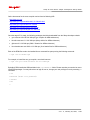
This chapter provides information on tools and equipment required to build the development environment for
Qt/Embedded and Qtopia applications on your desktop.
1.1.
Building Development Environment for Qt/Embedded Applications
The following are the tools and equipment needed to build a development environment on your desktop PC:
1.1.1.
PC-Linux
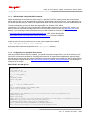
The development PC should have a Linux distribution pre-loaded on it. Preferably one that natively supports RPM
packages, such as RedHat, SuSE, Mandrake or Caldera. You can also use distributions such as Slackware and
Debian as well, but you may need to use a RPM conversion utility to support the RPM format. In this document,
RedHat 7.3 is used for the OS and "bash" is used for its shell.
Please also note that it is recommended that your PC that supports a PC card slot/reader, for use with a CF
memory card or SD memory card to install the developed applications onto the SL-series Zaurus.
If your Linux machine is equipped with USB, you may use the docking station and its USB connector to transfer
the developed applications to the SL-series Zaurus by installing the USB driver for the Linux PC. The USB driver
for the PC-Linux can be downloaded from the following URL. Note that this driver is also provided in the RPM
package and thus one may have to convert this package if your Linux distribution does not support the RPM
package by default.
http://www.zaurus.com/dev/tools/downloads/tools/kernel-zaurus-2.4.18.5-4a.i386.rpm
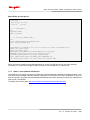
The following are some reference for the HDD, RAM, and CPU in preparing the PC to build your development
environment:
HDD:
CPU:
RAM:
1.1.2.
approx. 400MB free space or more
appropriate CPU to run the Linux distribution
appropriate CPU to run the Linux distribution
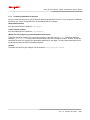
Setting up the cross-compiler for ARM/XScale
Because the SL-series Zaurus has an Intel StrongARM® or Intel Xscale® as its CPU, one needs to have an ARM
cross compiler for application development. The ARM cross compiler and the related tools for the SL-series
Zaurus can be found at the Sharp developer website (http://www.zaurus.com/dev). The following chapters will
provide you with the information on how to install and set up the tools required for development. All of the
directories and files explained in the following chapters are the default configuration of the tools. If you change the
directories or file names, you may have to make necessary adjustment in accordance with your changes.
Ver 1.11, February 28, 2003, 10/63