1
3
Features
3.1 Network connections
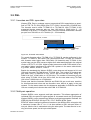
Watson SHDSL router supports various network connections. Besides the physical LAN and WAN connections, other logical connections, using tunneling protocols over existing connections, such as PPP and VPN can be configured.
Every network connection in Watson SHDSL router can be configured as one of
three types: WAN, LAN or DMZ. This provides high flexibility and increased functionality.
For example a network connection can be defined as a DMZ (Demilitarized) network. Although the network is physically inside Watson SHDSL router, it will
function as an unsecured, independent network, for which Watson merely acts
as a router.
3.1.1 Bridging
With the network bridging feature several network connections can be combined
together under one virtual network.
For example, creating one network for LAN Ethernet and WAN Ethernet devices.
3.1.2 Routing
Watson SHDSL router can be setup to use static or dynamic routing. Dynamic
routing automatically adjusts how packets travel on the network, whereas static
routing specifies a fixed routing path to neighboring destinations.
Watson SHDSL router supports two different routing modes:
In ROUTE mode Watson functions as a router between two networks.
In NAPT mode Watson performs Network Address and Port Translation. NAPT
refers to network address translation involving the mapping of port numbers, allowing multiple machines to share a single IP address. NAPT should be used if
the LAN encompasses multiple devices, a topology that necessitates port translation in addition to address translation.
Revision: 2012-02-15
3-1