1
Please visit the AEM EMS Tech Forum at http://www.aempower.com/bbs and register
your EMS before you start to use it. Make sure you enter your EMS serial number when
you register as doing this grants access to the calibration files. We always post the most
current strategy release, PC Software and base calibrations online. On the forum, you
will find many helpful hints/tips to make your EMS perform it’s best. Also, we may make
available EMS maps for engines running speed density, larger turbo, etc…
Read and understand these instructions BEFORE attempting to install this
product.
1) Removing the Stock Engine Control Unit
a) Access the stock Engine Control Unit (ECU). The location of the ECU on the
3000GT/Stealth is in the center console, behind the radio.
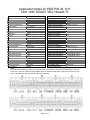
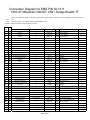
b) Carefully disconnect the wiring harness from the ECU. Avoid excessive stress or
pulling on the wires, as this may damage the wiring harness. Some factory
ECU’s use a bolt to retain the factory connectors, and it must be removed before
the harness can be disconnected. There may be more than one connector, and
they must all be removed without damage to work properly with the AEM ECU.
Do not cut any of the wires in the factory wiring harness to remove them.
c) Remove the fasteners securing the ECU to the car body, and set it aside. Do not
destroy or discard the factory ECU, as it can be reinstalled easily for street use
and troubleshooting.
2) Install the AEM Engine Management System.
a) Plug the factory wiring harness into the AEM ECU, and position it so that the
wires are not pulled tight or stressed. Secure it with the provided Velcro
fasteners.
b) Plug the comms cable into the EMS and into your PC.
c) Turn your ignition on but do not attempt to start the engine.
d) Upload the base calibration file (.cal) that most closely matches your vehicle’s
configuration. (These files can be found in the AEMPro/Base
Calibrations/Mitsubishi folder on your computer’s hard drive)
e) Set the throttle range: Select the Configure drop down menu, then ECU Setup |
Set Throttle Range and then follow the direction given on the screen.
f) Verify the ignition timing by selecting the Configure drop down menu, then ECU
Setup | Set Ignition. Use a timing light and compare the physical timing numbers
to the Parameter Ignition Timing displayed. Use the Advance/Retard buttons to
make the timing number match.
3) You are now ready to begin tuning your vehicle.
a) Note: This calibration needs to be properly tuned and is not recommended for
street use. NEVER TUNE YOUR VEHICLE WHILE DRIVING.
Page 3 of 3