1
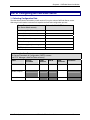
Chapter 2: Sample System
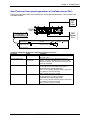
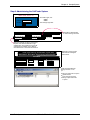
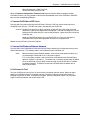
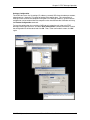
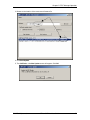
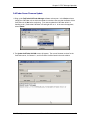
Step 1 Technical: Enter addresses of network servers in CF software.
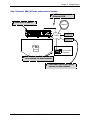
Once assigned an IP address on the network, the CallFinder’s software (configured via web browser) can
link it to other servers on the network.
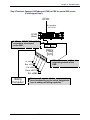
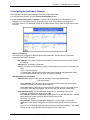
CallFinder gets own
IP address.
Administration: Time Configuration
Administration: IP Configuration
IP Address
192.168.4.89
Subnet Mask
255.255.255.0
Name Server 192.168.4.251
time.nist.gov
Time Server
Add Time Server
Default Gateway 192.168.4.1
Request Interval
Secondary
Name Server
Time Zone
update
Days 0
Hours 24
Minutes 0
(GMT-06:00) Central Time (US & Canada)
Date Format
mm/dd/yyyy
Time Format
12 hour
update
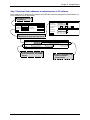
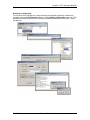
CallFinder links to Name Server,
Mail Server & (Internet) Time Server.
Administration: SMTP Configuration
SMTP Server Address mail.spigb.com
Administrator Email tomq.spigb.com
Server User ID
Password
Retype Password
update
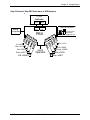
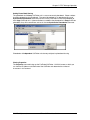
CallFinder may need User ID
and Password to accessMail
Server.
Multi-Tech Systems, Inc.
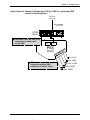
Logs of CallFinder calls
will be emailed to
administrator.
CF220 CallFinder User Guide
11