1
2.3.2 Floppy disk drive
1.
Remove the blanking covers of the 3.5" drive bay.
2.
Referring to Figure 2-3, insert a FDD into the drive bay with the
base facing inward. Fix the drive with screws.
3.
Connect 34-pin flat cable from the CPU card to the FDD.
4.
Plug a floppy drive power connector into the FDD.
2.4 Installing add-in cards
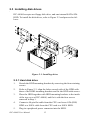
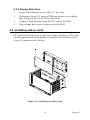
IPC-6806S can accept up to six half-sized cards (including a CPU card)
via the supported passive backplane. To install an add-in card, refer to
Figure 2-4 and proceed as follows:
Figure 2.4: Installing an add-in card
13
Chapter 2