1
RADIUS Authentication & User Profile Software
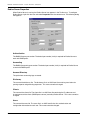
Realms
The name of the realms file. The realms file is an ASCII text file that lists authentication servers to
which a specific authentication request can be forwarded. This name cannot be changed.
Max Authentication Threads
The maximum number of threads that can be run at one time to perform authentication operations.
Max Accounting Threads
The maximum number of threads that can be run at one time to perform accounting operations.
Max Outstanding Requests
The maximum number of requests that can be queued up for processing.
Polling Interval for File Changes
The period in minutes after which the configuration files (users, realms, clients) are polled to check
whether they have been modified recently. If they have been modified, the corresponding data
structures are then dynamically updated.
Radius Software: “Clients” and “Users” Files
After installing the Radius software, the administrator must customize the “Clients” file and the
“Users” file for use in their specific network system. These files can be found in C:\Program
Files\MultiTech Systems\Radius Server. The “Clients” file and the “Users” file can both be opened in
Notepad or Wordpad text-processor application programs.
In the “Clients” file, the administrator specifies the IP address of the RAS Server and the “shared
secret” known to both the CommPlete 4000 RAS server and to the password authentication server.
Entries in the “Clients” file must be in this form:
<IP address of client> <blank or tab(s)> <shared secret> <new line>
The IP addresses should be in dotted notation only. Names are not permitted.
For Windows NT only. In the “Users” file, the administrator lists network users by name and specifies
authentication/password parameters. The "users" file can include another file which contains a list of
users. The syntax is as follows:
$include <full path to the users file>.
When this command is employed under Windows NT, the authentication server can use the same
user database as the host server.
The first line in each user entry contains the following information:
<User name> <Tab> <Check List>
The <User name> field must start from the first column. The <Check List> field can have the
following info :
CommPlete 4000 Communications Server Quick Start Guide
21