1
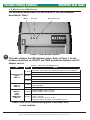
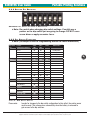
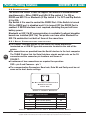
Portable Printing Solutions S4500THS User Guide 3.3 COMMUNICATIONS: The S4500THS Printer is able to support two modes of communication simultaneously – Either RS232 and IrDA (If Dip switch # 1 is ON) or RS232 and 802.11b or Bluetooth (If Dip switch # 1 is OFF and Dip Switch # 2 is ON). Dip Switch # 2 is used to control the RS232 Port. If the Switch is turned ON the RS232 port is disabled and if it is turned OFF the RS232 Port is enabled. If RS232 interface is not required, disabling the port will save battery power. Bluetooth or 802.11b RF communication is available if optional daughter boards are installed (802.11b). The printer can have either Bluetooth or 802.11b enabled but not both of them at the same time. 3.3.1 SERIAL COMMUNICATIONS SPECIFICATION: The 10 RS232C Interface signals for the S4500THS Series printers are terminated on a 6 PIN RJ type data connector located on the side of the printer. Six connections are provided from the Serial Interface to the host computer. The TABLE 3 below lists the Serial Interface signals and pin outs on the RJ connector and the connector pin locations are shown in FIGURE 7. A minimum of two connections are required for operation: RXD – pin 3 and Common – pin 1 The communication Parameters: Baud rate, Data Bit and Parity must be set same as the host device settings. RJ DATA CONNECTOR SHOWING PIN NUMBER LOCATIONS FRONT VIEW FIGURE 7 - RJ DATA CONNECTOR RJ25 Connector Pin Number Functional Description Signal Name 3 RS232 from Host (INPUT) RXD 2 RS232 from Printer (OUTPUT) TXD 6 Request to send from Host (INPUT) RTS 4 Clear to from Printer (OUTPUT) CTS Logic common COM 1,5 TABLE 3 - 4500THS PRINTERS' SERIAL RS232C INTERFACE SIGNALS Extech Instruments Corporation 285 Bear Hill Road, Waltham, MA 02451-1064 Phone: 1-877-4-EXTECH (439-8324) Fax: (781) 890-7864 Web site: www.extech.com Copyright © 2005 Extech Instruments Corporation. All rights reserved including the right of reproduction in whole or in part in any form.