1
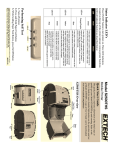
1.3 Reading the LED Status The illustration below points out the location of the LED indicators described in Table 1 FIGURE 4: LED INDICATOR LOCATIONS This table explains the LED indicator status. Refer to Figure 1 for the locations described for ON/OFF and FEED pushbutton switches and AC adaptor socket. Table 1 - Reading the LED Status LED Indicator State GREEN LED#1 PURPLE/ ORANGE BLUE LED # 2 YELLOW GREEN Status If the LED’s Color is Green it indicates that Power is ON and that the printer is in RS232 or IrDA mode If the LED’s Color is PURPLE it indicates LOW power in Bluetooth (BT) mode. If it is ORANGE it indicates low power in RS232 mode. If the LED’s Color is Blue it indicates that Power is ON and that the printer is in Bluetooth mode The battery is being charged at a fast rate. If the battery is below 5V, the battery is being “trickle” charged until the battery voltage reaches 5V, and then the fast charge rate is started. The LED will turn off when the battery is fully charged. Indicates that MCR is ready to accept data. LED # 3 RED Indicates a fault condition or a printer error. The printer is not ready to accept data. Printer is out-of-paper Note: Refer to the troubleshooting guide to determine error or fault condition. 2500THS User’s Guide Rev 5.1 9