1
Troubleshooting
Flowchart 8 - 16
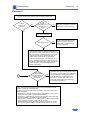
Flowchart 8
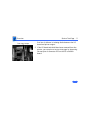
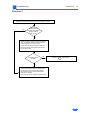
Symptom: Printer comes ready but does not deliver a startup page.
Is paper
jammed in the
printer?
No
Did
the pickup
rollers rotate (i.e. in an
attempt to pick up
paper)?
Yes
The problem is likely mechanical,
either with a misaligned or damaged
pickup roller or a faulty cassette.
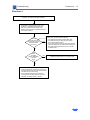
No
Yes
Run a service test page.
Does pickup occur?
Yes
Double check to see that you have
turned on the startup page in the
Printer Utility. If problem persists,
replace the I/O board.
No
If the printer comes ready, but does not respond to a
print request for a service test page, the problem is not
with the I/O board. If further testing shows that a host
computer can print from the multipurpose tray, the
problem is also not with the DC controller board.
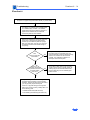
Check for loose connections, especially at P/J 20 on
the DC controller board and at the cables leading into
the cassette feeder board. If the problem persists, the
problem could be in the cassette feed solenoid or
cassette feeder board.
A
Have you
recently serviced
the printer and has this
symptom existed
ever since?
No
Yes
Check for loose connections at the turn at the
registration clutches. If unusual grinding sounds
are occurring, you may have erred in reassembly,
perhaps in the paper-handling gear assembly,
main gear assembly, or in the two clutches.
If the jam is in the fuser area, make sure the
fuser is fully seated and the fuser guide lever
is undamaged (see "Basics").
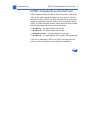
Firstly, make sure that the paper being used is within specification and that
there is no obstruction in the paper path.
If paper is okay and the path is clear, try printing in other ways to see if paper
feed is successful:
• Multipurpose vs. cassette: Success from the multipurpose tray may suggest a
problem with the cassette or cassette pickup elements.
• Short-edge vs. long-edge feed: Success in one mode and not the other might
suggest a registration or cassette size sensor problem.
• Service page vs. host print job: Successful printing of a service test page when
normal pages jam suggests a problem with the I/O board.
• Printer location/time of day: Successful printing in one location or at certain
times of day suggests humidity or temperature factors that are out of spec.