1
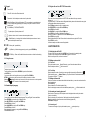
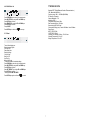
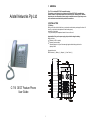
2.2. Keypad
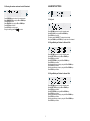
2.5. Register this unit to a DECT GAP base station
Power On/Off
Caller ID - List the caller ID and missed call
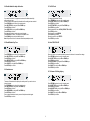
Every new unit must be registered onto a DECT GAP base station before you can make
a phone call.
To activate the DECT GAP base station’s Registration Mode, please refer to base station user guide
for Registration Mode activation procedures.
Press UP/Down key when the unit is in standby mode..
Select REGISTER by using the UP and DOWN keys.
Press INT/OK key to confirm.
Select BASE No. by using the UP and DOWN keys.
Press INT/OK key to confirm. It will display “Searching…”
Wait for 15 seconds till 11 digits RFPI No. XXXXX-XXXXXX appears
Press INT/OK key to confirm
Enter the Base station PIN Code. Please refer to the base station user guide for Pin Code.
Press INT/OK to confirm
It will be at standby mode after successful registration.
Phone book - List the telephone number stored in phone book
Mute/Clear/Escape - Mute key (Microphone OFF in conversation), c orrect mistake input
(Clear) or escape from programming menu and any time press 2 seconds to return to
standby mode.
R (Flash/Recall) - FOR PABX TRANSFER
Speaker phone - Speaker phone on/off
Speaker volume control - Increase or decrease speaker volume
Redial/Pause key - browsing of the last three dialed telephone numbers or Insert a
pause in phone book telephone number input.
M1~ M6
áâ
Memory dial - speed dial key
3. UNIT OPERATION
Up/Down key - Activate the programming menu by press UP/DOWN key.
3.1. Switching the unit On/Off
To power off the unit, press and hold the INT/OK key for 2 seconds in the standby mode.
To power on the unit press and hold the INT/OK key again for 2 seconds.
When the unit is power off, no call can be received.
INT/OK Key - Power on/off, establish internal connection or c onfirm function setting.
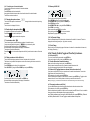
2.3. Using the menu
3.2. Making an external call
3.2.1. Direct call
Pick up the handset or press Speaker Phone key, you will hear the external dial tone.
Enter the telephone number and wait for connection
The phone is menu driven.
To enter the Menu, press the Menu UP/DOWN key and confirm selection
with INT/OK key.
You are now able to scroll through the menu by using the UP and DOWN Key.
INT/OK key is almost every time used to confirm a setting or to enter a sub menu.
Clear key
(Erase key) is almost every time used to return to previous menu or abort operation.
Press Clear
key for 2 seconds to return to stand by mode.
3.2.2. Pre- dialing
Enter the telephone number. If needed, you can erase digits by pressing the Erase button C
.
Lift the handset or press
Speaker Phone key. The phone number will be dialed automatically.
The maximum 25 digits can be dialed.
3.3. Making an internal call
If you have more than one handset subscribed to the base station, you can make an internal call between the handsets.
Press INT/OK key
Press a handset No. The called handset will ring
When the called party answers, talk to the handsfree speaker phone
or lift the handset to talk.
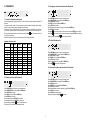
2.4. Handset display language
3.4. Answering an incoming phone call
When there is an incoming call, the telephone number is displayed when sent by the network
(if service is available).
When the incoming call is an internal call, the display shows the calling handset No.
When it’s an external call and the number is not transferred (private call),
‘EXTERNAL‘ is displayed.
You can select one of three different display languages. They are English, German and Italian.
Press UP/DOWN key when the unit is in standby mode..
Select HS SETTING by using the UP and DOWN keys.
Press INT/OK key to confirm.
Select LANGUAGE by using the UP and DOWN keys.
Press INT/OK key to confirm.
Select the desired language by using the UP and DOWN keys.
Press INT/OK to confirm.
3.4.1. Answering call
To answer an incoming call, pick up the handset or press
2
speaker phone key.