1
Placing a call:
EXTERNAL CALLS:
NOTE: All telephones have a “hot” keypad that allows immediate dialing
without lifting receiver. This will automatically activate the SPEAKER option on
each telephone. To move a call from speaker to handset, simply lift handset.
• Dial the 10-digit telephone number and select OK
INTERNAL CALLS:
• Dial Internal Extension number only and select OK
INTERCOM CALL (COM GROUP)
Place an intercom call to a member of your “group” using the telephone’s
speaker.
LAST NUMBER REDIAL
Enables user to REDIAL the last number dialed
(internal or external)
HO LD
Place a caller on hold .at your extension, retrievable only by
user. The HOLD ICON will appear in the display as the call is
holding.
K EYSET S – co nta in th e e xten s io n n u mb er
o n a sen so r b utt on
NONK EYSET S – d is pla y t h e exte ns ion
n u mb er on t he te lep ho ne d is play
TRANSFER
Transfer a call to another party
* NOTE – If BLIND TRANSFER is selected, the call will immediately transfer to
desired extension
CONSULT
nd
Consult privately with a 2 party
CONFERENCE
Create a Quick Conference Call
(maximum of 3 parties)
MUTE
To temporarily deactivate the microphone on the handset or speakerphone.
Telephone Reference Guide
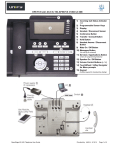
UNIFY – Openstage 60 telephones
• Press the COM SPEAK button
• Dial the 2-digit intercom code for the individual you wish to
“intercom”
• Wait for confirmation tone and then begin speaking.
HANDSET-FREE
• Press the OK button twice (call defaults to Speakerphone)
OR
• Lift the handset
• Press OK on Redial menu option (number displays in field)
During a call, lightly press the HOLD button
OR
• LIGHTLY press the EXTENSION button (if a keyset)
KEYSETS: Extension will blink to indicate HELD CALL
NONKEYSETS: The Hold Icon will appear on the display next to
caller ID
NOTE: For NON KEYSETS - Do NOT replace handset in cradle
during hold.
To take the call OFF of HOLD:
• Scroll (>) to and select RECONNECT from menu options
OR Replace the handset in cradle and answer
• KEYSETS may press the blinking extension to reconnect to caller
• During a call, press the TRANSFER button OR select CONSULT
from the menu
OR
• Scroll to and select BLIND TRANSFER
• Dial the extension number, select OK
(If conducting a Blind Transfer, call is now transferred)
• If CONSULTING or CONFERENCING
• Announce the call
• Hang up or Scroll to and select:
o Alternate (toggles between the two calls)
o Complete Xfer (sends the call)
o Conference (joins all parties)
o Blind Transfer
o Hold (places current connection on Hold)
o Disconnect & Return (disconnects current
connection and returns to call being transferred)
• If the party does not answer or does not want to join:
to and select Disconnect & Return
• Scroll
• Press the Mute button
• The light on Mute button will illuminate to ensure feature is
activated.
• To Deactivate mute, press the lit Mute button
• The light on the Mute button will deactivate
Page 2 of 4
Copyright © 2007, InfoTel Integrated Services