1
The Power of Being There®
Quick Installation Guide
®
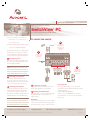
SwitchView PC
2 or 4-Port PS/2 Desktop KVM Switch
Safety Notice
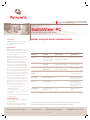
Hotkey and push button reference sheet
Caution: To ensure safe use of this product,
use only the power adapter provided by
the manufacturer.
USA Notification
Warning: Changes or modifications to this unit
not expressly approved by the party responsible
for compliance could void the user’s authority
to operate the equipment.
Note: This equipment has been tested and
found to comply with the limits for a Class
B digital device, pursuant to Part 15 of the
FCC Rules. These limits are designed to
provide reasonable protection against harmful
interference in a residential installation. This
equipment generates, uses and can radiate
radio frequency energy and, if not installed
and used in accordance with the instructions,
may cause harmful interference to radio communications. However, there is no guarantee
that interference will not occur in a particular
installation. If this equipment does cause
harmful interference to radio or television reception, which can be determined by turning
the equipment off and on, the user is encouraged to try to correct the interference by one
or more of the following measures:
• Reorient or relocate the receiving antenna.
• Increase the separation between the
equipment and receiver.
• Connect the equipment into an outlet on a
circuit different from that to which the receiver
is connected.
• Consult the dealer or an experienced radio/TV
technician for help.
Canadian Notification
This Class B digital apparatus complies with
Canadian ICES-003.
Cet appareil numérique de la classe B est
conforme à la norme NMB-003 du Canada.
To Contact Avocent Technical Support
COMMAND
HOTKEYS
PUSH BUTTON
DESCRIPTION
Select PC
ScrLk + ScrLk + X1
x = 1 ~ 2 or 1 ~ 4 for
PC channel number
Press the select button to
toggle to the next channel
Select the active channel
Next Lower Channel
ScrLk + ScrLk +
Up Arrow
Press the select button to
toggle to the next channel
Select the next
connected channel
Next Higher Channel
ScrLk + ScrLk +
Down Arrow
Press the select button to
switch to the next channel
Select the next
connected channel
Beep Sound
On/Off
ScrLk + ScrLk + B
N/A
Toggle on/off beep sound
for switching confirmation
Reset KVM
ScrLk + ScrLk + End
N/A
Reset the KVM switch for
switch system reboot
Autoscan
ScrLk + ScrLk + S
N/A
Autoscan through every
connected channel for
quick screen browsing of
each channel
Stop Autoscan
Press any key on the
keyboard
N/A
Terminate autoscan
activity
1. X denotes a number key for the selected port number (1-4). Only the top row number keys on your
keyboard are available for hotkeys. Do not use the number pad for hotkey commands.
Call (888) 793-8763
VISIT www.avocent.com/support
Avocent, the Avocent logo, The Power of Being There and LongView are registered trademarks of Avocent Corporation or its affiliates. ©2005 Avocent Corporation. All rights reserved.
DOWNLOAD www.avocent.com
590-492-501A