1
Projection Setup
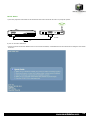
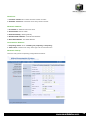
*** Click [Projection Setup] button
•<Resolution>: 1024*768, 1280x768 and 800*600.
•<Color Depth>: provide Wi-View 300v output with 16bit or 32 bit color depth. It depends on your PC settings.
•<Screen Refresh Rate>: This is VGA output refresh rate, provides 60 Hz and 75Hz suitable for different projectors.
•<Login Code>: You can select Disable, Random, or Use the following code to set a specified 4-characters number.
•<Apply>: Confirmation and Save modifications
•<Cancel>: Cancel all the modifications
Changing Passwords
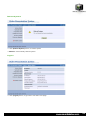
*** Click [Change Password] button, to change password value.
• <Enter New Password>: enter new password you want to change for each category.
• <Confirm New Password>: re-confirm new password.
• <Apply>: Confirmation and Save modifications.
21