1
Voice
•
•
•
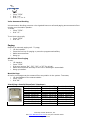
Call a DSS Number
Lift handset.
Press desired softkey.
Speak to called agent.
Tone Calling
If the system is programmed for tone signal as the first option, pressing “ITCM” a second time is
not necessary.
• Lift handset.
• Press “ITCM”.
• Dial the extension number.
• Press “ITCM” again. Called station will ring.
Tone
•
•
•
•
Call a DSS Number
Lift handset.
Press softkey pre-programmed for the desired station
Press “ITCM”.
When the party answers, respond as usual.
Make an OHVA Call
Places a voice announcement on another station that is off-hook or busy on a call.
• Make intercom call.
• At five quick tone bursts, make announcement. If a busy tone sounds, OHVA is not
available.
• Wait for reply. If your station is an LCD speakerphone, the called agent may send a nonverbal reply to your display. When the message is displayed, the station is disconnected.
OHVA or SOHVA?
Intercom announcements may be received as on off-hook voice announcement (OHVA) or a secure
off-hook voice announcement (SOHVA). The method is dependent upon the class of service
programming and type of equipment being used at the called station.
Speed Dialing
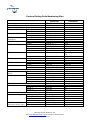
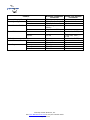
To dial station speed dial numbers:
• Consult your speed dial directory (see printable index card on page 14 of
this document).
• Dial 0-9 for a personal speed dial number
Dial station speed dial numbers when listening to the dial tone
• Press “HOLD”
• Dial 0-9.
Comdial 6714X-PG
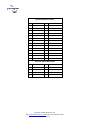
Dial system speed dial numbers
• Consult your speed dial directory (see printable index card on page 14 of this document).
• Press “*”.
• Dial the memory location (01-99) for the desired system speed dial number.
Dial system speed dial numbers while listening to dial tone
Courtesy of Main Resource, Inc.
Visit www.MainResource.com for all your Comdial needs.
Page 3 of 14