1
Table of Content
Chapter 1.
1.1
1.2
1.3
Introduction .................................................................................. 5
Product Overview ........................................................................ 5
Specifications .............................................................................. 6
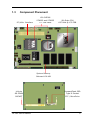
Component Placement ................................................................ 9
Chapter 2. Hardware Setup.......................................................................... 11
2.1
2.2
2.3
2.4
2.5
2.6
2.7
2.8
2.9
2.10
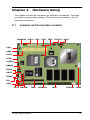
Jumpers and Connectors Location............................................ 11
2.1.1
Jumpers Reference..................................................... 12
2.1.2
Connectors Reference ................................................ 13
CPU and DRAM Setting ............................................................ 14
CMOS Setting ........................................................................... 14
Watchdog Timer Setting ............................................................ 15
Embedded Flash Disk ............................................................... 16
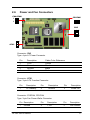
Power and Fan Connectors....................................................... 17
VGA Interface ............................................................................ 18
2.7.1
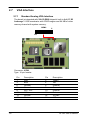
Standard Analog VGA Interface................................... 18
2.7.2
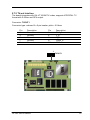
TV-out Interface ........................................................... 19
2.7.3
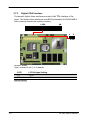
Digital VGA Interface................................................... 20
Ethernet Interface...................................................................... 22
Audio Interface .......................................................................... 23
Multiple I/O Port Configuration .................................................. 24
2.10.1
2.11
Expansive Bus Interfaces .......................................................... 25
2.11.1
2.12
COM1 VCC Mode Selection ....................................... 24
PC/104-plus Interface ................................................. 25
Switches and Indicators ............................................................ 26
Chapter 3. BIOS Setup ................................................................................. 27
3.1
Flat Panel Type Setting ............................................................. 28
3.1.1
Advanced Chipset Features Screen............................ 28
3.1.2
Panel Type .................................................................. 29
LE-362 User’s Manual
3