1
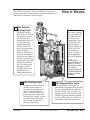
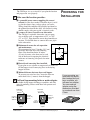
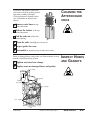
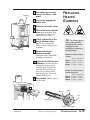
The RTD probe monitors the temperature of the drying air as
it enters the hopper. If the probe is not installed correctly,
temperature readings will be inaccurate.
1
CONNECTING THE
RTD PROBE
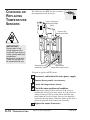
Insert the probe in
the delivery air inlet at
the side of the hopper. The
end of the probe must be
centered on the airstream.
Tighten the nuts to lock the
probe in place.
2
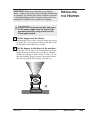
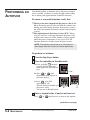
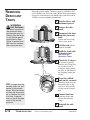
Plug the probe’s cable into the
receptacle on top of the dryer
electrical enclosure. Hand tighten the connector. Coil excess cable
and secure with a wire tie.
CM Car
ousel
Dryer
Power
WARNING: Always disconnect
and lock out the main power sources
before making electrical connections.
Electrical connections should be
made only by qualified personnel.
1
ON
O
O
F
F
se
t
3
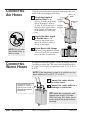
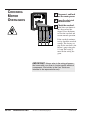
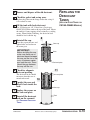
Disconnect and lock out the main power source.
If the dryer is fitted with the optional lockout
device turn the disconnect dial on the dryer
door to the Off position. Turn the captive
screw, and swing the door open.
+
IP
TR
Re
2
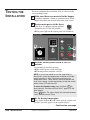
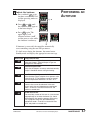
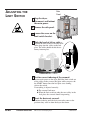
Open the dryer’s electrical enclosure.
Insert the main power wire
through the knockout in the side of the
enclosure. Secure the wire with a rubber compression fitting or strain relief.
Connect the power
wires as shown in your
wiring diagram.
5
L3
1 3
L1 L2
10E
4
Connect the ground
wire to the grounding
T1
2
T2
4
T3
6
N.O.
14
B
C
A
D
A
M
R
2
T
1
4
T
2
6
T
3
9
8
point shown in the wiring
diagram.
UGD018/0101
CONNECTING THE
MAIN POWER
CM Carousel Dehumidifying Dryer
IMPORTANT: Always
refer to the wiring diagrams
that came with your dryer
before making electrical
connections. The diagrams
show the minimum size
main power cable required
for your dryer, and the
most accurate electrical
component information.
INSTALLATION
3-7