1
PennNet Phone: Polycom SoundPoint IP 320/321 Quick Guide
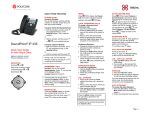
Features
Graphical LCD Display
Dial
View standard phone information such as time, date, total number of missed calls, and select various
softkeys.
Press to dial a phone number or view the placed call lists
Menu
Activate features for basic phone settings, such as ringtone and backlit display.
Microphone Mute
Toggle the microphone on and off during a conversation. When on, callers can’t hear you.
Volume
Adjust the volume of the handset, speaker, or ringer.
Softkeys
Activate various features and functions. Softkeys change depending on the calling feature or option
selected.
Scroll through menu options. Use the checkmark button to select an item,
Navigation arrows
Line indicator
Lines/Speed Dial keys
Solid green – An active call is in progress; Fast flashing green – There is an incoming, ringing call;
Flashing red – The call is on hold; Solid red – The line is busy remotely (shared lines).
Use these keys to get dial tone or activate one speed dial.
Dial pad
Use the 12 keys for dialing and entering contact information such as names and telephone numbers.
Hold
Place a caller on hold or resume a held call.
Headset
Listen hands-free by inserting the plug of the headset into the headset jack and toggling the Headset
button on or off.
Toggle the speakerphone off and on.
Speakerphone
ISC Networking & Telecommunications
3