1
CONTENTS
Introduction
Exceptional processing and
amplifying performance .............................................. 1
Using the SPA20 with other Primare products ............ 2
Technical specifications ............................................... 2
Choosing the surround mode ...................................
Locking the front panel .............................................
Saving the configuration ...........................................
Configuring the on-screen display .............................
Configuring the front panel display ..........................
Configuring the remote control ................................
14
15
15
17
17
17
How to get started
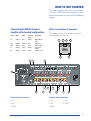
Connecting the SPA20 Surround Amplifier with
standard configurations ...............................................
Quick connection of speakers .....................................
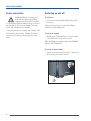
Power connection .......................................................
Switching on and off ...................................................
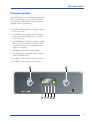
Front panel controls ....................................................
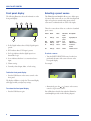
Front panel display .....................................................
Selecting a preset source ..............................................
Setting up the speakers
3
3
4
4
5
6
6
Configuring the speakers ..........................................
Selection of possible speaker configurations ..............
Setting the speaker delays ..........................................
Setting the speaker levels ...........................................
Setting the analogue input level ................................
19
19
20
21
22
Setting up the sources
Advanced connecting
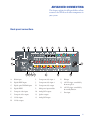
Back panel connections ...............................................
Power connection .......................................................
Main outputs ..............................................................
Audio inputs ...............................................................
Video connections ......................................................
Record inputs .............................................................
Data and RS232 .........................................................
DC-trigger outputs (12V) ...........................................
Connecting to the Primare V25 DVD Player ..............
7
8
8
8
8
9
9
9
9
Standard sources .......................................................
Removing sources .....................................................
Editing sources ..........................................................
Examples of sources ..................................................
23
23
24
25
Index
................................................................................. 27
Operating the SPA20
Changing volume ..................................................... 11
Changing levels ......................................................... 11
Using menus
Using the main menu ............................................... 13
Using the menus ....................................................... 13
III
SPA20 SURROUND AMPLIFIER USER GUIDE