1
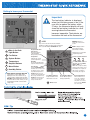
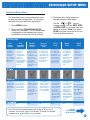
Getting to know your thermostat
2
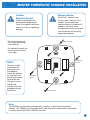
Important:
The low battery indicator is displayed
when the AA battery power is low. If the
user fails to replace the battery within
21 days, the thermostat display will only
show the low battery indicator as a final
warning before the thermostat
becomes inoperable. The batteries are
located on the back of the thermostat.
5
1
4
7
6
3
1
LCD
Days of the week and time. Flashes ambient
humidity level. May also flash outside temperature
when used with R250W. OUTDOOR will show.
2
Glow in the Dark
Light Button
3
Fan Button
Programmable Time
Period Icons:
This thermostat has
4 programmable
time periods per day.
4
System Button
Temperature:
Indicates the current
system temperature.
5
Temperature
Setpoint Buttons
Humidity:
Shows the humidity target
setpoint settings and keys.
6
Menu Button
7
Humidity Button
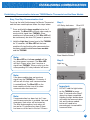
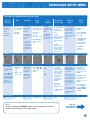
NOTE ABOUT THE LIGHT BUTTON:
This button is used to light up the
display, but it is also used to set up
communication with the base module.
DO NOT hold the light button down for
more then 10 seconds, unless you are
performing the initial communication
setup steps.
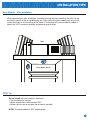
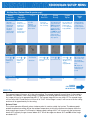
Clean Display:
Pressing CLEAN DISPLAY
will allow 30 seconds to clean
the display. The keys will be
inoperable during this time.
CLEAN will appear if your
contractor has programmed a
filter change reminder. Press
CLEAN when filter has been
replaced to reset the filter
change reminder timer.
REMOTE indicates a
remote has control of the
system.
HOLD is displayed when
thermostat program is
permanently overridden.
Displays the user selectable
setpoint temperature.
System operation indicators:
The COOL, HEAT or FAN icon
will display when the COOL,
HEAT or FAN is on.
NOTE: The compressor delay
feature is active if these icons
are flashing. The compressor
will not turn on until the 5
minute delay has elapsed.
COOL
Low Battery Indicator:
Replace batteries when
this indicator is shown.
Wireless Icon
Program Menu Options:
Shows different options
during programming.
HEAT
FAN
System Information:
Shows which zone or
zones are controlling
your system. Shown
only when one or more
indoor sensors R251W
are connected.
2